Tag Archives: Engagement

Easier Invitations

A responsible event planner ought to shoulder the effort and responsibility of getting audience members connected and engaged in a presentation. That is, if they want people to connect. Of course, there will always be the attendees who are excited to try anything new- some of them would jump through flaming hoops in order to engage. We like those people. But, they’re a minority among meeting and conference attendees.

For the rest of the people, getting connected to whatever technology or participating must be easy. Because people are… well, sometimes we don’t want to exert ourselves, do we? That’s the nice way to say it, right? It’s on you, the presenter, planner or leader to help the rest of the auditorium to participate in a presentation.

Don’t Worry. We’ve got your back.

If you’ve got 800 people attending your conference and you want as many of them as possible to engage during your opening and closing sessions, that’s as simple as uploading a list to the SlideKlowd platform and emailing each and every one of them an invitation. Don’t worry. It’s easy. Just take your attendee list, drop it into the template .xlsx file provided on the Invitations page in SlideKlowd, then upload it to the SlideKlowd platform. The only required information in the document is an email address, but first and last name, organization and a custom ID code are also information fields in the spreadsheet. The custom ID code would be something like a student or employer ID number.

Screen Shot 2014-01-28 at 12.06.50 PM

Because it’s awesome, SlideKlowd removes any duplicates from the list. Once the information has been uploaded, you have the option to review each and every person’s information before sending a mass email out all at once. Once it’s sent, you can search by name to determine whether or not particular individuals were included on the list.

Screen Shot 2014-01-28 at 2.48.15 PM

We’ve put a nifty email together that can help users do a couple of things. If they’re using SlideKlowd for the first time and don’t have an account, they can create one (with complete, accurate information) before joining a presentation. All they have to do is scroll down in the email and click Edit. If the attendee hasn’t participated in a SlideKlowd event before and they don’t have the time to make sure their account is accurate, all they have to do is click Join. The platform creates an account for them and emails a temporary password to the address used for creating the account.

If you want to include your own special instructions or details in the email, that option is available on the invitations page. Simply click Edit Invite. Type to your heart’s content, then make sure to save your edits. You also have the option of changing who the invitation is from- just in case you aren’t actually the person doing the presentation.

The great thing about smart devices is that your audience will receive the emailed invitation on the same device they’ll likely use to connect to a presentation. All because you went ahead and made engaging so much easier for them. Good job. You deserve a donut and some coffee.

The Second Screen

tonight

*Photo by Robert S. Donovan: http://www.flickr.com/photos/booleansplit/

How many times have you grabbed your tablet or laptop while watching one of the too many crime shows on television because you wanted to google something you saw to see if it was true? Did you watch the rest of the program with your technology in-hand, your attention vacillating between screens? If  yes, then you’re definitely not alone.

A while ago, television networks figured out that huge portions of viewers watch shows on their television- while using a laptop, tablet or smart phone in one way or another. Viewers had Facebook and Twitter open and sometimes visited program websites. Basically, people are able to consume content from more than one screen at a time. One response was to give shows, even individual episodes their own hashtags encouraging audiences to interact with each other during programming. Some websites began including the supplementary content they thought people would look up on their own anyway.

The great thing about this technology is that it’s mobile. Very few people sit at a desktop while watching television, it’s just not as comfortable as watching our favorite shows from the sofa, recliner or bed. Nearly everybody who’s got a web-enabled mobile device brings it everywhere with them. We’ve also been seeing these devices at lectures, presentations, sporting events, political rallies- you name it- for years now. And as event planners are wising up to harness this technology, we’re seeing the second screen come in to play in all kinds of places.

Have you ever been to a sporting event and had lacked a decent view of the jumbotron or whatever giant(ish) screen the venue used for replays and all the extra facts about a player or the game itself? Frustrating, isn’t it? Wouldn’t it be better if you could just glance at your phone and see what’s going on? Political events aren’t any different. We’ve all listened to someone that we support and have still felt the need to look something up just to make sure they weren’t exaggerating, even just a little. How would you, as part of the voting public feel if a candidate pushed sources from his speech directly to your phone while speaking? Would that increase your trust in them and their causes? It’s better than trying to remember what to look up when you get home, isn’t it?

TEDxHelsinki: audience

*Photo by Mikko Reinikainen: http://www.flickr.com/photos/mtreinik/

This is the second screen. It’s supplementary in so many situations.

2013 brought about a huge adoption of BYOD (Bring Your Own Device) in the workplace and at events. People prefer to use the technology they’re familiar with. Thus far, predictions are pointing toward increased use of audience devices to get people engaged during events in 2014. Unfettered access to wifi and charging stations have already become mandatory at any noteworthy event, because nothing’s worse than trying to work with substandard wifi or panicking over nearly dead devices then fighting with a perfectly nice stranger who needs the same outlet you do for exactly the same reason.

The way we experience events (even remotely) will change as planners think ahead and encourage us to engage online- realtime. Really, there are only two ways to engage users on their own devices. Planners and presenters can enable them via web browsers on devices or using apps. A differentiator in which will succeed and which won’t is the ease of getting connected. Few people will jump through hoops to get connected- even during an event.

As a second-screen app, SlideKlowd approaches this a few different ways.

First, if the event required registration and the event planners know their audience’s email addresses, they can simply upload all of them into the platform (with minimal effort) and send every attendee on their list an invitation. Using this, any participant can get content sent to their “second screen” with just one click.

Screen Shot 2013-12-31 at 10.52.24 AM

Otherwise, participants can join a presentation by going to join.slideklowd.com, logging in and using the Klowd Key that was created by the presenter or event planners. It’s that easy. Event planners have other options to make sure the right people are joining presentations by making them invite-only or filtering by participant email domain (@yourcompany.com, for instance). SlideKlowd offers a number of features to compliment the second-screen nature of the platform, too. Because as event planners are still learning, engagement is more than offering more content- it’s also hearing what your audience has to say.

Passive Listening Isn’t Actually a Thing

Workshop

Some of us talk back to the television. We must. We can’t simply sit still to take in the action and dialogue, but we have to share our opinions, express our outrage and vocalize all of the joy we find in whatever program or movie we’re watching. If we find ourselves not in front of a screen, but instead listening to some sort of speech or presentation, we might still insist on sharing commentary with anyone nearby who’d listen. But, not everybody is like that.

Some viewers are content to sit back and let the plot of whatever sitcom or romcom happens to be on wash over them. Some geniuses were paid to write this stuff, right? What could I possibly contribute to the story? Maybe this is fine, but that same kind of passive consumption has made its way into our workshops, classes, conferences and meetings.

Placid consumerism doesn’t belong in any kind of an educational environment. The notion of an audience quietly sitting, eating up every little thing some guru at the front of the room says seems natural enough to many of us, but that’s only because from childhood, most of us have been (unhelpfully) trained to not interrupt our teachers. We’ve been told that we can ask questions near the end of or after class. Work might be just as bad- nobody wants to speak over their supervisor or the company CEO, right?  Well, even if the smartest man in the world is speaking, simply sitting there listening to him is much less educational than you’d think. Benjamin Franklin said,

Tell me and I forget.
Teach me and I remember.
Involve me and I learn.

If you’re a teacher, trainer, coach or have any involvement in educating people at all, you want them to learn. Rote memorization might help an individual pass a test or get licensure, but when your pupil has to do something, they’ll likely need more than facts. They’ll need an understanding that is incredibly difficult to attain by listening alone.

So what do you do? You invite people to make comments. Ask questions. To actively engage the subject at hand, because that helps them think about it and understand it. Maybe talking back to the television is weird (it totally is) but the people who do it are engaging both characters and plot and they have a more impactful experience than the person who stays quiet the entire time. SlideKlowd helps you bring that out in your classes and audiences, minus some of the social weirdness.

The SlideKlowd platform provides new avenues for interaction, using a participant’s smart phone, tablet or laptop. Personal devices become the mechanism for not only consuming content, but responding to it as well. SlideKlowd allows users to interact with each other via the Comment Stream, Facebook and Twitter. They also have the ability to ask a presenter questions, which help them get what they need or want out of a presentation. Finally, the presenter can add any of the 11 different interactions in the platform to a slide to gather information from an audience or to increase interaction, attention and therefore retention of the subject.

*Photo by Heinrich-Böll-Stiftung: http://www.flickr.com/photos/boellstiftung/

How do you know that your audience is engaged?

You’ve prepped your audience-and got everyone connected to your SlideKlowd event on their smartphones, tablets or laptops. You’ve got the Event Key displayed on your Third Screen and you’re about to blow their minds. But you wonder, “How will I know if they’re paying attention?”

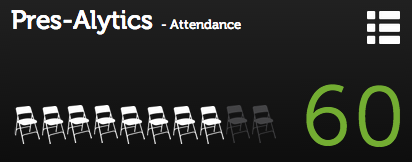
In the Presenter Dashboard, notice the Pres-Alytics (Attendance) area. There you’ll see a row of ten chairs and a green number. The green number is the total number of people have logged into your event.  If you have an audience with web-enabled devices, this should close to the same number of people in your session.

Screen Shot 2013-06-04 at 2.39.33 PM

The chairs indicate what percentage of your attendees are currently engaged. As the image shows, if 80% of the chairs are lit up then 8 of the 10 chairs will be lit up.

Who’s Engaged?

We know what you’re asking: how do we know if a person is or isn’t engaged? It’s not quite magic, but it’s as close as any developers could get.  Every two seconds, we send a “ping” to each device that is logged in. If they are still logged in, then all is well. If not, then after 30 seconds of inactivity by an attendee, it will be reflected in the Pres-Alytics row of chairs.  Note that every disengagement by an attendee is tracked in the analytics.

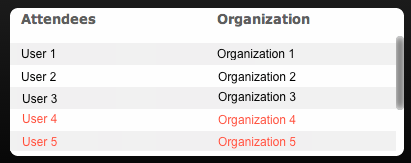
If you want to know who is or is not paying attention, just click or touch the list icon just above the green audience number to see the name of each person who has logged in to your event. If they’ve completed their audience profile, their organization will be displayed as well. Any person whose display name is in black is currently engaged. The names in red have disconnected from the presentation or need to wake their device back up.

engagement

Other Ways to Use Pres-Alytics:

As we described, the Pres-Alytics is a real-time and at-a-glance view of engagement.  What else can you do with this info?

  • You can use it to monitor the over-all engagement level of the session.  If you notice the chairs start to go dark, we suggest that you add some interaction on the fly – or break out your “RiverDance” routine.
  • If you are in a compliance or training-type presentation, you can use the Pres-Alytics to report on participation and engagement level.  Then you can call them out by name and tell them to pay attention!
  • If you are giving a sales or motivational presentation, you can monitor the Pres-Alytics to be sure your call-to-action is at the height of emotion.  If all the chairs are lit up, ask for the deal, the donation or the vote!

After Your Session

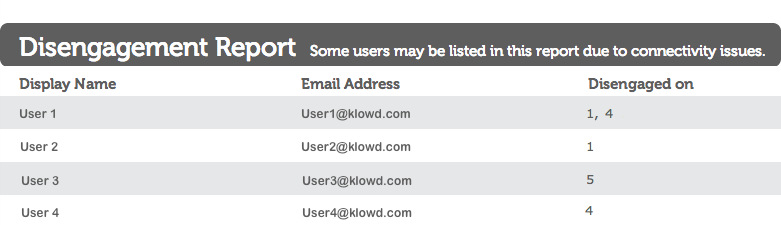
After you’re done presenting, take a look at the disengagement report in the Presentation Analytics to see what slide(s) they disconnected on. Consider your content: your slide, what you said, whether or not you had an interaction. Based on this data you can adjust and improve your next presentation.

Screen Shot 2013-06-05 at 3.17.06 PM

Presenter Feature: SK Rating

Basic rule of success #208:

You can’t improve what you don’t measure.

Screen Shot 2013-06-04 at 4.55.07 PMAs a presenter or speaker, you want proof that you’re awesome. That way, when you tell people, you have something to back it up. The SK (SlideKlowd) Rating is just that: a numeric grade on how well you engage your audience and get them to interact during your presentation.

The SlideKlowd platform records an SK Rating for each individual presentation as well as a cumulative average from all of your presentations – which becomes your presenter SK Rating. Were you feeling a little off your game last time you presented? Compare that event’s SK Rating to your overall number to find out if your audience thought so too. Dig in to the metrics to see where people disengaged or what interactions they ignored, because both of those will be reflected in your SK Rating.

Metrics

The SK Rating hangs out on the dashboard, under My Settings. Click on the SK Icon to discover just how great you are. It works on a scale of 1 to 100 – and just like most grades, the higher the number, the better. A presenter’s SK Rating is calculated using a few factors:

1- User Engagement- a cumulative percentage of engaged audience members per slide; throughout the course of the entire presentation activity.

2- Interaction Level – an aggregate percentage of interactions answered by all “joined” audience members over the course of the entire presentation.

3- EQ Rating- The Emotional Quotient is a composite of responses across ALL joined audience members to the automatic closing slide question of “How would you rate this presentation?”

4- Two optional bonus areas include Social and Notes. Each is a total of the percentage of audience members per presentation of who posted comments and/or used the audience note-taking tool. These interactions can only add to your SK Rating- a lack of comments, questions or notes does not deduct from it.

The numbers from Engagement, Interaction, EQ Rating and the bonuses are plugged into a patent-pending algorithm that crunches them into a number anyone can understand. Depending on what matters more to you as a presenter, the weight of each factor can be adjusted using the slide controls on the SK Rating dashboard. So, if you were wrongly heckled all the way through your presentation and you don’t want audience opinion to have any impact on your SK Rating, then drop its weight to a zero. It’s also a way to find out which you’re better at; keeping your audience engaged, or getting them to interact.
SK Rating Setting

Discovering which parts of your presentation engage people the most or the least will help you to become a better presenter. Once you start improving that, you’ll earn a higher SK Rating. As that goes up, so do your bragging rights. And ultimately the people who get to listen to you will be the real winners.

 SK Rating in Organizations

Organizations have just as much use for the SK Rating as any individual. Here are just a handful of ways a company or school can utilize this feature:

1- Efficiency- The SK Rating can help a Training Department improve the presentations and outcomes of a training session by holding the facilitators accountable.

2- Communication- Hear what your employees have to say about a meeting or presentation. An event’s SK Rating indicates employee engagement with the content and the presenter.

3- Competition- Put SlideKlowd in the hands of your sales team. They’ll work for higher SK Ratings and they’ll know what to work on- knowledge, skills or personality- which can only lead to increased sales.

4- Prediction- An SK Rating reflects both the presenter’s effectiveness and the audience’s reception. Use the SK Rating to determine the likelihood of closing a lead as potential buyers warm up to signing a check.

5- Assessment- Discuss a facilitator’s SK Rating during their annual evaluation. If it’s low, get that person into some training. On the other hand, promote a rock star to lead the team and reap the benefits of a Org. Development team that knows what it’s doing.

Build a Relationship with Your Audience

An audience might be gathered to listen or learn, but often, many people want to be heard, too. SlideKlowd’s audience engagement platform helps speakers know what their audience is thinking, so listeners don’t have to send a “Dear John” letter like Dr. Michelle Mazur wrote as she explains what not to do in communicating.

Read Dr. Mazur’s letter here.


Brain, Interrupted- A Study on Multi-tasking

An experiment by Alessandro Acquisti at Carnegie Mellon indicated that multi-tasking could kill retention and focus – up to twenty percent lost with each change of task. One major culprit is the personal technology we all love and refuse to put away.

SlideKlowd utilizes people’s affection for (dependence on) smartphones, tablets and laptops as a means to increase focus and engagement during a presentation. Invite the audience to participate using surveys, multiple-choice options and other engagement tools to that can be added to any presentation via SlideKlowd. They get to keep their technology; you get to keep their attention.

Read the New York Times article about Acquisti’s research…