Monthly Archives: February 2013

Creating A Presentation Buzz

Millions of dollars a year are spent on figuring out how to get audiences to pay attention. Products like Prezi, SlideRocket and SlideShare aim to fix the content of the presentation. Others, like Turning Technologies, Poll Anywhere, and iSurvey, were designed to capture audience responses. Venues, AV firms and event planners have work tirelessly to manage the presentation environment while corporate coaches have been hired to train for better presenter skills. “Being able to achieve all four in one platform was the goal of SlideKlowd from its inception”, says CEO Ken Holsinger.

SlideKlowd achieves what no one product does: it incorporates all the elements of an effective presentation – Presenter, Content, Audience and Environment – into a single platform. Presentations and meetings have the ability to create powerful experiences for the audience producing a veritable buzz in the room.

Here’s how we work the SlideKlowd magic to create that presentation buzz.

PRESENTER
AnalyticsScreenshot

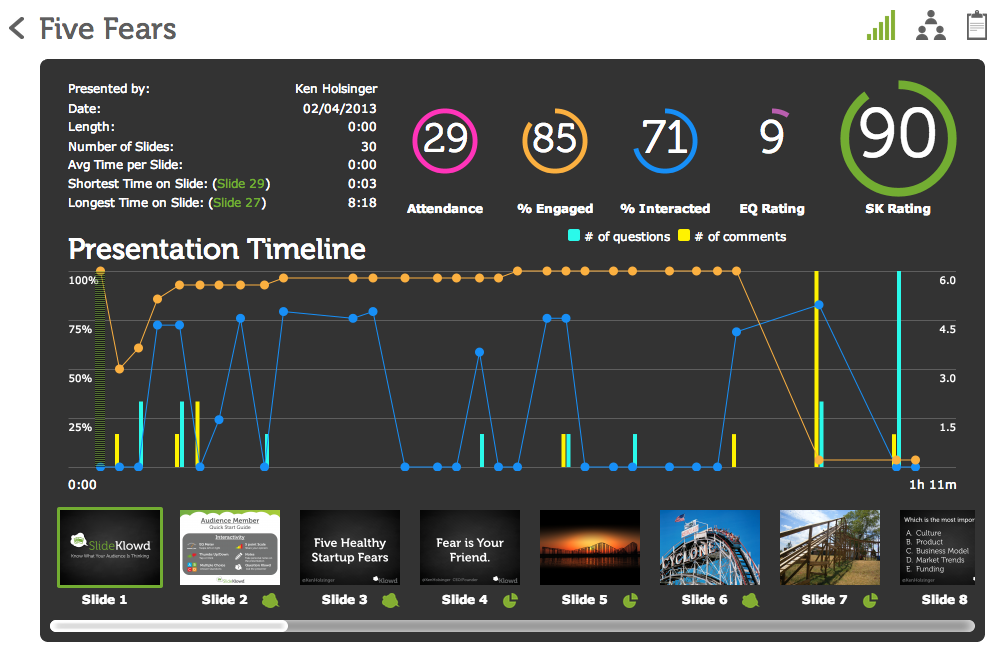
Exhibit 1. SlideKlowd Analytics Infographic

Presenters are much more likely to improve their presentation skills when they receive measurable feedback on their performance. That measurement comes in the form of SlideKlowd Analytics. “SlideKlowd Analytics emphasizes one of our core principles,” says Holsinger. “You can’t improve what you don’t know.”

After each presentation, the presenter will receive an SK (SlideKlowd) Rating that places variable weight on a number of key performance factors:

  • Percent of audience engaged (percent who remained on the app)
  • Percent of audience that interacted (based on responses, questions and comments)
  • EQ rating (the rating the audience gave the presenter at the end of the presentation)

The presenter will also receive an infographic-style report, as illustrated in Exhibit 1, either exported as an HTML or CSV file, which gives them data on:

  • How the audience felt about the presenter
  • How the audience felt about the presenter’s content
  • The content of responses, questions and comments of each audience member by slide
  • Survey/poll responses of each audience member
  • Number of attendees and their sign-in information

To learn more about how SlideKlowd’s Analytics works check out our blog or click on our YouTube video below.

CONTENT
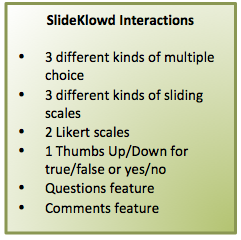
SKInteractions

Exhibit 2. SlideKlowd’s 11 Interactions

The human brain loves to be stimulated. It is your job as a presenter to stimulate the audience member’s brains to affect a behavior or create a response.  SlideKlowd is designed to break the traditional, linear format of delivering content so that your content becomes more stimulating. We unite BYOD (Bring-Your-Own Device) to your content and automatically create a level of engagement you didn’t have before. Add up to eleven different interactions (See Exhibit 2) and your content becomes more attractive. You don’t have to change your content to use SlideKlowd and create instant appeal from your audience.

AUDIENCE
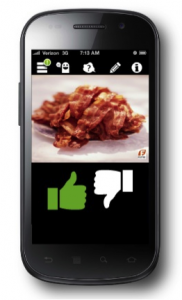
AudienceApp

Exhibit 3. SlideKlowd Audience App

How do you know what the audience is thinking during your presentation? Visual cues often give you some indication of how they are feeling but what about those stoic types that show no emotion on their faces? SlideKlowd allows you to engage with your audience, at the level you decide, and receive real-time feedback about how they are feeling.

Audience members can access your SlideKlowd presentation through any mobile device or modern browser and receive your content real-time. Through SlideKlowd’s interactions you can create five behaviors or responses from audiences:

  • Data collection: Asking the audience for specific data and information.
  • Self-assessment: Prompting audience members to rate themselves on a particular topic or issue.
  • Feedback/opinion: Asking the audience for their opinion.
  • Behavior request: A specific call-to-action or buy-in request such as a purchase, a vote, or a decision.
  • Knowledge level: Testing the knowledge level of the audience. This could include current knowledge level as well as a “pop quiz” to test retention.

The audience can save personal notes on the individual slides and the presentation, if the presenter allows, to their account for future review.

ENVIRONMENT
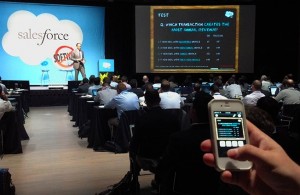
dreamforce3Web

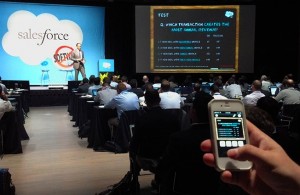
Exhibit 4. Salesforce’s CFO, Graham Smith, engages with his audience via their mobile devices

The last element of an effective presentation is the environment, the atmosphere against which the presenter and the presentation is seen and felt. The entire audience experience pivots around the quality of your environment. SlideKlowd amplifies the venue and facilities you choose by creating an innovative, fun and social atmosphere for the audience.

SlideKlowd’s cloud-based, mobile platform encourages dialogue between presenter and audience. By allowing audience members to participate via their mobile devices and share in the conversation, the room becomes more social and energized. Sharing results of interactions, like opinions and feedback, on the projection screen incites crowd emotion and allows the audience to feel heard.

Awesome presentations are dynamic and dependent on a number of variables that we, as presenters, often can’t control. SlideKlowd is the first social engagement platform that gives you a real-time connection with your audience by measuring engagement, distributing content, and capturing feedback and opinions… from any device. Simply take your content, upload to SlideKlowd and maximize all four elements of an awesome presentation to ignite that perfect presentation buzz.

“think dialog, not monologue”

A gentleman we respect and like, Gavin McMahon (read our blog post on him here) wrote a thoughtful and insightful review of SlideKlowd. He believes, as we do, that SlideKlowd transforms the PowerPoint presenter epidemic of monologue – what he refers to as PPMS (PowerPoint Monologuing Syndrome) – into a dialog. Thank you Gavin for taking the time to write about us! Check out the review on his blog here.

How do you get an audience ready for a SlideKlowd presentation?

It would be totally groovy if all audience members accessed SlideKlowd before the presentation started so that you are not taking time at the beginning of the presentation to get them signed on. Accessing and registering on SlideKlowd, either through a smartphone app or browser, is seriously painless so it just about sending out a few friendly reminders.

You have five reminder opportunities to give them instructions on how to access SlideKlowd.

1. On your event website: Let your guests know that you will be using a cool app to allow them to immediately tell the presenter what they are thinking throughout the presentation. Use this “benefit to the audience” as a way to differentiate your event as hip, innovative and relevant. Just like you!

2. During the registration process: Once a guest has registered, they will receive a confirmation email with the essentials. Go ahead and add instructions to that e-communication on accessing SlideKlowd. Provide the event key, if you want, but it is not necessary at this point. Here’s what we included in an email that went out before one of our CEO’s presentations using SlideKlowd.

BYOD3. E-Reminder: About one week out you will send out another email that says “Hey, if you forgot that you registered for my event, here are the details.” Prominently include SlideKlowd instructions similar to the BYOD box above.

4. Table Decoration: Place a handout at each table setting or on each chair with download and sign-in information. Include the event key. Below is an example of what one of our clients used as their handout. If you need help creating a handout, contact us.

QuickStartGuide

5. Default first slide: If all else fails, you’ve got your initial default slide that pops up before you launch your event that details how to sign in and your event key. This is what it will look like:

1stSlide-Sign-in

If you are still facing a few folks who just refuse to sign-in, rest assured they will want to after they see everyone else participating. You’ll often see the stragglers sign-in right after that first interaction when you ask everyone else their opinion about something important to them.

“Audience Management – Tools, Software and Tickling”

Thank you David Dallaire of Fennec Marketing Group for sharing information on SlideKlowd in his blog post, “Audience Management – Tools, Software and Tickling.” It is a nice overview of how SlideKlowd combines presentations, the cloud, mobile and data management into one platform for audience engagement.

HR Professionals and Executives: How to use SlideKlowd

The top challenge facing HR executives is retaining and rewarding their best employees according to a 2012 SHRM Research Spotlight. This is pretty typical of what you might see on research conducted in the last few years. What has changed is what organizations are doing about it.  Where as better pay and benefits may entice your top talent to leave, your culture of openness and innovation can keep them staying forever. SlideKlowd helps you manage your culture of trust and open communication through your daily functions of employee training, development, and education. At the same time, you can use the SlideKlowd platform to increase accountability, gather data on your audience and embrace technology.

Culture of Openness

MultipleChoiceInteractionHow your employees live your culture of openness and trust helps define your company’s brand and creates a high level of employee satisfaction. After you have clearly identified your culture and communicated it to your employees, breathe life into it by using SlideKlowd. SlideKlowd’s platform encourages conversation and discussion while letting you know what your employees are thinking. Use one of SlideKlowd’s nine interactions, as illustrated in the graphic to the left, to connect you with your employees, gather their opinions, ask for their feedback and create one-on-on engagement that creates a truly memorable experience for them.

Retention and Accountability

Ever trained on material and wondered if your audience got it? Do you have a distinct feeling that your audience is present in body but not in mind? Training is expensive and what is even more expensive is having to do it multiple times. Use SlideKlowd to gauge if your employees are absorbing what you are teaching them. Learn more about using the multiple-choice feature to test retention on our blog.

You will also be able to measure your trainer’s performance and ability to engage his/her audience through SlideKlowd’s robust Analytics.  SlideKlowd Analytics brings additional accountability to trainers by measuring every element of a presentation; from how the employees felt about the trainer and his/her content to every question, comment or survey/poll response provided by the employee.  For more information on how SlideKlowd’s analytics works check out our blog.

Connecting with Gen Y Employees

SurfIncubatorPresWith the Gen Y’s oldest members entering their 30s and becoming a force in the workplace, employers have to find new ways to attract and accommodate young workers or risk losing out on top talent. One of the best ways to connect with your Gen Y employees is to show them that you care what they think. Integrating SlideKlowd multiple choice, sliding scales and yes/no interactions and the questions and comments features into your training allows you to gather instantaneous feedback and respond real-time to their concerns. Immediately sharing those results gives your Gen Y employees confidence that they have been heard. For more information on how to connect with a Gen Y audience visit our blog.

Embrace Technology (BYOD and Cloud)

As HR professionals and executives adapt to the new environment of social, mobile and cloud, they are adopting bring your own device (BYOD) programs and flexible, centralized cloud-based SaaS (Software as a Service) solutions. According to a recent Avanade survey more than six in ten companies (61 percent) report the majority of their employees now use personal computing devices in the workplace.

The BYOD trend does not mean you have to lose control over your employee presentation. SlideKlowd allows you to create real-time interaction with your employees via their smart phones, tablets and laptops and stimulate conversation while being notified whether you’ve lost any of them to a distraction on their device. Add an interaction every few minutes by asking them to share their opinion, answer a multiple-choice question or comment on a topic through their mobile device and instantly you have increased your audience engagement. Create instant discussion points from the results of your interactions and you’ve just sparked a conversation. Let the comments stream on the employee’s devices and you’ve created a collaborative forum.

Human resources managers are increasingly turning to cloud computing options according to a new Silkroad survey of more than 5,700 HR professionals in North America. The prime attraction to cloud was access regardless of location or time of day. As virtual workers become more common, HR is compelled to find new ways to connect their employees with training and development opportunities. SlideKlowd is a cloud-based, mobile platform that works on any device and communicates with other operational systems, like your CRM or web-based email.

Using SlideKlowd to create a social, open environment with your employees allows you to shift away from compliance to a more strategic role of culture management and organizational development. It transforms HR functions of employee training, development, and education away from employee acquiescence to a more collaborative and fun experience of the presenter and audience.

SlideKlowd Announces “Killer” Presentation Analytics

Klowd.com, creators of SlideKlowd, the world’s first Audience Engagement Platform, announced today a series of new SlideKlowd feature enhancements.  The highlight of the new releases is an updated and more robust analytics package.

CEO & Founder Ken Holsinger says “The updates we’ve made to our analytics engine will give users access to business intelligence they simply can’t get elsewhere”.

SlideKlowd’s new analytics release includes:

  • Renders reports on attendance, levels of engagement and percentages of interaction.
  • Provides infographic-style report on engagement levels, responses and number of comments and questions.
  • View slide-by-slide detail of responses, questions and comments.
  • Download as HTML or CSV file
  • Displays Presentation history dashboard by presenter.

AnalyticsScreenshot

“This release emphasizes one of our core principles” says Holsinger “You can’t improve what you don’t know.”   SlideKlowd Analytics brings additional accountability to presentations – and presenters – by measuring every element of a presentation; from how the audience felt about the presenter and his/her content to every question, comment or survey/poll response provided by the audience.  Presenters and facilitators can receive real-time data during a presentation – then view the post-event data in an infographic-style report that can be exported as HTML or CSV file. “SlideKlowd tells you what your audience is thinking” says Holsinger.  “Our analytics package presents what they are thinking in a way that is easy to understand and useful to a presenter and an organization.”

The new enhancements to SlideKlowd analytics are available as part of any current or new client’s software license.  For a video of a full walk-through of the analytics of an actual presentation, click below.

Roger Courville’s Review of SlideKlowd

Last Friday we gave you some insight into a person we like, Roger Courville, of The 1080 Group. If you haven’t had a chance to read the blog post, take a look here. We also wanted to take a moment and share his review of SlideKlowd as a platform for virtual presentations or classes. We appreciate that Roger will always give his readers his honest opinion of products he reviews. Take a look: http://thevirtualpresenter.com/delivery/meet-slideklowd

People We Like: Roger Courville

Roger CourvilleRoger Courville is someone you want to know if you do a lot of web presentations. First, he’s just a nice, helpful guy. But he is also a wiz at helping companies create focused virtual presentations that captivate an audience and achieve measurable results. He is the author of The Virtual Presenter’s Handbook, blogger at TheVirtualPresenter.com, and an internationally sought-after speaker on how to improve productivity using virtual communications. He is the principal at 1080 Group, LLC, a training firm that offers evidence-based skills development for professionals using web conferencing, webinars, and virtual classrooms. If you want to know more about Roger, take a look at a recent interview we did with him.

1. How do you serve your clients? We help people take the discomfort and disconnect out of virtual events. Usually the question on the table is, “How do I really engage an audience that I can’t see?” Sometimes this is a planning and design issue, and sometimes it’s a question of adapting one’s presentation skills.

2. Who are your clients? Most are the kinds that are big enough to have attorneys who write contracts saying that we can’t name them <grin>. We do a limited amount of coaching and consulting, but we’re expensive enough that it tends to be someone who’s got a motivated commitment to personal growth (like professional speakers).

3. What has been one of your biggest business successes to date and why? In one case where we can name names, we’re proud of being chosen to partner with the American Management Association to develop a $2,000-per-head course that’s really deep. In a world where free and lousy webinars-about-webinars abound, it shows that quality professional skill development still has value.

4. What are you passionate about? I’m unbelievably thrilled to help others have “aha!” moments. It only takes one time to transform how you do something for the rest of your life, which is pretty compelling ROE (return on experience).

5. What do you read? Professionally I’m a geek. Besides a large volume of books on presenting and communicating, I primarily read academic research reports about attention, cognition, design, and anything related to how we communicate to stimulate the senses, the brain, and the heart. The current personal reading list includes Thinking Fast and Slow, Neuromarketing, and The 15 Invaluable Laws of Growth.

6. Why should someone follow you on Twitter? I’d ask the question, “Why would you pay attention to someone on Twitter?” I follow everyone back, but I use Tweetdeck to hone the list to those I actually connect with. Here’s a hint: I think the word “social” is missing in most people’s use of “social media.” Follow him here.

7. Who do you like? For starters, I sure enjoyed meeting you (he is referring to Justin Foster, SlideKlowd’s CMO). Besides my wife and kids, I tend to love whoever’s standing right in front of me telling me how I just helped them do their job or live their life better. It’s humbling to just love on people.

Entrepreneurs: Four Ways to Use SlideKlowd

Having an idea accepted and supported, and even funded, is something that you require on a daily basis. Whether presenting to a potential client, investor, or the business community, your presentation and sales skills are always being tested. How do know what your audience is thinking? Typically, non-vocal cues, like a head nod or a smile, are good indicators. But what about those straight-faced, cerebral types? You can use SlideKlowd to achieve a real-time connection with your audience by measuring engagement, distributing content, and capturing their feedback and opinions…from any device. Here are four scenarios where you can use SlideKlowd.

Client Pitch

SlideKlowd helps structure a sales presentation into a pitchbook format to guide the conversation with your audience, encourage one-on-one engagement, determine the client’s need for your product, and provide timely opportunities to ask for the sale. This way you can communicate and build rapport with your audience, rather than just lecturing them about the features and benefits of their product.

Here’s our SLIDE approach to creating a pitchbook presentation with SlideKlowd: Creating One-on-One Engagement Through Pitchbook Presentations. Incorporating SlideKlowd and the SLIDE format into your client pitch allows you to connect to your clients, gather their opinions, ask for their feedback and create one-on-on engagement that creates a truly memorable experience for them.

Investor Panel Pitch

DavMcClureYou have approximately 10 minutes to capture the investor’s attention from the moment they sit down until the buzzer goes off. Your investor pitch should not only include the essentials, such as key financial drivers, a strong business model and a smart marketing plan, but also a compelling story that hits them at their core. In addition, your story needs to be captivating enough to keep the investors from being distracted.

Here are three ways you can use SlideKlowd to create real-time engagement and immediate behavior change with your investors:

  1. Take the investors through a scenario that illustrates the problem you are trying to solve. Tap into their emotion and what matters to them most. This may require doing some research on them beforehand. Once you’ve connected with them at a human level, use SlideKlowd to ask them how they feel about the problem. Ask them to commit to their own pain! Then introduce the solution: your product!
  2. Have a little fun talking about the competition. Let them know you’ve done your homework by presenting who your competitors are and then “quiz” them on who has a bigger market share in a specific area. Make sure it is a market that you are not focused on. Share results and let them know the right answer. The next slide will be information on your product’s advantage and the niche market you are targeting.
  3. At the end of your pitch, ask them how much they would spend to solve the problem. Use the multiple-choice interaction to give them options.

Startup Showcase or Conference Booth

Participating in a Tech Cocktail startup showcase, a meetup or a conference can quickly lead to the dreaded task of manning a trade show booth. And we all know how fun that is! You can easily make it an interactive experience with your audience, by adding SlideKlowd awesomeness. Talk to the event organizer and ask them to include instructions on downloading SlideKlowd in the registration process. In exchange, you will add content they want delivered to the audience member’s devices, collect responses and share results back with them. If that doesn’t fly, ask guests to download the free app when they arrive at your booth.

Use SlideKlowd to collect data from your audience, have them rate themselves on a particular issue, ask for their opinion or provide feedback. Once they have signed-in to the app, you have their name, email address and any other information you have requested. Your presentation deck alternates with one slide of product information and one of nine different SlideKlowd interactions. While you have let your guests know that their opinion matters you have conducted valuable market research. For more information on how to use SlideKlowd to gather data from your audience visit our blog post on Presenter Feature Scenario: Data and Information Collection.

Speaking Gig

dreamforce3Web

Salesforce’s CFO, Graham Smith, using SlideKlowd at the 2012 Dreamforce Conference.

You haven’t gotten where you are without being an expert in something. Because of this you are often asked to speak at events. SlideKlowd can be used to sweeten the pot on your presentations. Take the content, upload to SlideKlowd and voila! You now have reached a larger and more engaged audience, at the same time helping them stay away from shenanigans on their devices. Take it a step further, and use SlideKlowd to ask for a behavior change, gather feedback and conduct market research.

See how our clients have used SlideKlowd in their speaking gigs here.

Whether you are pitching your idea to a small group or presenting on a topic to a larger audience, allow your audience to bring their device and use SlideKlowd to:

  • Immediate feedback on what your audience is thinking.
  • Increase engagement.
  • Collect audience data and responses.
  • Manage messages, content, and participation.

Commerce Director Sayer Transforms a Public Address into a Conversation

From the moment Jeff Sayer stepped into his new position as Idaho’s new Commerce Director in the fall of 2011, he has been working vigorously to “move at the speed of business.” His focus from the outset was to re-engage with businesses and the Legislature to accelerate Idaho’s economic development process. During the Boise Metro Chamber’s 2013 Annual Legislative Forum, Sayer used SlideKlowd to demonstrate his commitment to this focus of re-engagement and the theme of the event: Partners for Idaho’s Economy-Legislative and Business Engagement.

As part of the registration process, over 400 business leaders and state legislators were asked to download the SlideKlowd app on their smart phone, tablet or laptop. During his keynote, Sayer used the SlideKlowd platform to create real-time interaction with each audience member, distribute content and capture their feedback and opinions from their device. He encouraged the collaborative process by sharing all responses of survey questions on the large projection screen on the stage.

Through this connection, he not only created a more engaged and interested audience but also gathered data on responses to drive the agenda and key initiatives for the 2013 Legislative Session.

The Boise Metro Chamber of Commerce shared the results of questions he asked his audience in the February edition of their monthly publication, “Metro Connections”, as seen below.


For the complete February Metro Connections publication, go to http://www.boisechamber.org/cwt/external/wcpages/chamber/publications.aspx