Have you ever wondered where the idea for SlideKlowd came from? Seriously, how does somebody think up something so great? Eagle Magazine has the story, along with some insight into why working at Klowd.com is so awesome.

Have you ever wondered where the idea for SlideKlowd came from? Seriously, how does somebody think up something so great? Eagle Magazine has the story, along with some insight into why working at Klowd.com is so awesome.
 A recent report indicated that tablet ownership among adults has increased from 18 to 34 percent in the last year. That’s a huge jump in twelve short months. As more and more people are buying tablets and smart phones and taking them everywhere with them, technology has been a bit of a question for communicators, trainers and teachers who believe they have to compete with attention-grabbing devices during classes, presentations and any other event involving crowds of people.
It’s okay. Embrace the technology.
First, viewing potentially distracting technology as a competitor for attention is basically admitting defeat before you start. Smart companies and individuals are finding ways to embrace mobile technology. All kinds of organizations are implementing BYOD (Bring Your Own Device) programs. Many students, participants and employees prefer to use their own technology at school, events and even work. It makes sense that we all operate more efficiently on technology we’re familiar with and that we’ve set up to our own preferences.
Second, technology can be used to draw people into an event rather than help them escape from it. For example- if you’re speaking to a board and you’re projecting video, or your PowerPoint presentation, their phones, tablets or laptops can be utilized for pushing information to your audience. The same can be used for polling. If we move our example from the boardroom to the classroom, polling becomes testing- with immediate results.
SlideKlowd utilizes the screens that people are carrying all over the place and refuse to part with. The platform pushes your presentation to the user’s phone for a hybrid experience where they see and hear and interact a teacher, trainer or whomever like they normally would, but also engage with that person and the rest of the room using their mobile device. That’s always preferable to catching them playing Candy Crush while you speak, right?
Add collaboration to the mix and this meeting or class has become quite the party. Users can take notes, ask questions and make comments from their devices. This helps everyone with a device to contribute to the conversation in a meaningful way.
Technology is out there, in the office, the board room, conference or classroom, waiting to be utilized. If you leave it alone, it might not work in your favor. But if you use SlideKlowd to engage your audience and their tablets, smart phones and laptops, you’ll come out at the end of the day looking like a boss.
One of the best ways to become a better speaker, teacher or presenter is ask questions. First, it gives your audience, classroom or co-workers an opportunity to contribute. This changes the presentation from a monologue into a conversation. Everybody prefers conversation to lecture. Second, it directs your presentation to the material that your audience, coworkers or class wants. It also helps you learn and grow.
Asking questions also enables you to collect informal content. This is the stuff that you want, because it points to what you did well, what people are interested in and helps a presenter, teacher or trainer infer what they could have done better or even what their audience isn’t interested in.
Two Types of Content
There are two kinds of content. The first is formal. Your formal content is the stuff that you create or curate. It’s your PowerPoint presentation, your notes and any other media that you include when you train, teach or speak to a group. The informal content is what happens during your class, presentation or event. It includes the human reactions to your content. It’s the way people answer those questions that good speakers ask. It’s how often a person in your audience checks out to do something else. This stuff is pure gold.
Informal content hasn’t always been easy to measure. Speakers had to really pay attention to what was going on in an audience to understand when people were paying attention, when they didn’t like something and if they’d checked out or not. That kind of effort sounds exhausting and truly only works for small gatherings. Even the greatest presenters probably didn’t have a great way to record that kind of information, Either.
SlideKlowd Collects Informal Content
SlideKlowd pushes content to mobile devices- smart phones, tablets and laptops. This is fantastic because an audience gets up close and personal with what the presenter wants them to see. The platform also gives presenters the tools to ask questions and effectively collect answers, using the same devices that viewers are using to connect to a presentation.
SlideKlowd also logs when a person joins a presentation, when they cut out for a while and if they choose not to respond to a question. The platform also records questions, comments and social media interactions. All of this stuff paints a clear picture of how an audience liked or disliked, maybe even slept through a presentation.
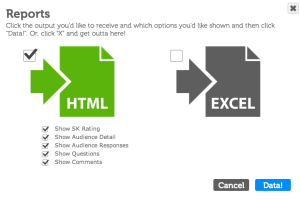
The platform presents all of this data in our analytics. Presenters or trainers have the option to view a sexy html version, or they can be downloaded in an Excel format. Both are incredibly useful.
Informal Content Matters
This is a lot of information, but it’s all incredibly useful. Presenters, trainers, teachers executives and anybody else who has to speak to a group of people for any reason can use this information to improve their presentation skills or their presentation. Managers can use it to track employee engagement in training. The sales department can use SlideKlowd to gage potential buyers.