Monthly Archives: August 2013

10 EdTech Startups You Must Know About

Santosh Bhaskar recently wrote an article for the EdTech Review focusing on ten startups that have created platforms that enhance education. All of the technology included brings students and educators together, delivers content and helps get some serious learning done. We’re honored that SlideKlowd was included!

SlideKlowd belongs in the classroom. The platform enables teachers to harness their students’ technology and maintain attention. Educators learn what’s really engaging their students and can figure out how to drive some of their weaker points home.

Read the article here!

Justin Foster, SlideKlowd CMO at the Utah Publicity Summit

logo

SlideKlowd’s CMO, Justin Foster will be speaking at the Utah Publicity Summit on September 12th. The summit features five speakers total and a media panel. Participants will learn how to effectively and appropriately market their company, book or cause using the web, social marketing and other tools. This will also be a great networking opportunity. 

Cost is $49.95 and includes lunch.

Justin is bringing SlideKlowd to the Summit for his presentation, Human Bacon: How to Create an Awesome Personal Brand. Seating is limited, so if you’re planning on attending, register now, you won’t want to miss it!

People We Like: Jan Schultink

Jan Schultink 3x4Jan Schultink is a busy guy. He’s the founder and CEO of Idea Transplant, a presentation design firm in Tel Aviv. He’s been designing high-stakes presentations for startups and large enterprises since 2003. Jan also brings ten years of strategy consulting to the table- he’s got a unique combination of skills to offer his clients. If that’s not enough, he is also the author of Pitch It! a fantastic book on presentation design.

We recently asked Jan to share a little more about himself:


How do you serve your clients?
A presentation design project is pretty straightforward. We usually start with a 45 minute briefing. Most of the time, a client has some sort of old slide deck that can be the basis for the discussion. However, I value the verbal story more than any previously designed visuals. It is this audio track that will form the input for the design work.

Unlike traditional designers, I will go back to the client for approval of colours, messages, structure, but rather work to the a point where the presentation is 75% ready with minor back and forth iterations via email left to be done to get to a final product. 

Who are your clients?
Either very small start ups looking to raise money, or very large corporates presenting to the stock market, mostly in the U.S

What has been one of your biggest business successes to date and why?
Not sure whether I can single out one specific example. I consider to be my general success the ability to build a global micro brand on my own as one of the world’s best designers in investor presentations.

What are you passionate about?
 Beauty, I like things that look good.

What do you read?
I am not a big reader. I collect coffee table books in graphics design, and read the occasional novel. Maybe when my family grows a bit older I might have more time to pick up a book over the weekend.

Why should someone follow you on Twitter?
My Twitter feed consists for 50% of my blog feed (usually 1 post per work day), and links related to (presentation) design that I stumble across.  

Who do you like?
If this means, people you follow online: Not necessarily designers, but people outside my own profession. Venture capitalists who blog about fund raising, typographers, academics, marketing gurus, people who sit close to breaking news.

New and Improved: The SlideKlowd Dashboard

We like to keep things fresh. And useful. So, we updated the Admin Dashboard in the SlideKlowd platform. It’s sexy, don’t you think? Let’s talk about the changes:

Screen Shot 2013-08-09 at 10.14.58 AM

  1. New Information- Your name, date that you became a klowdie, number of presentations given, etc.  are all now displayed on the dashboard. This information could be useful for your resume or, if  you’re a supervisor, to discover how many sales presentations one of your employees has accomplished. Note also your total attendance- this is the total number of people who have participated in your presentations.
  2. Paginated Display- This shiny new section of the dashboard displays important stuff. It starts with helpful tips from the SK blog. The remaining two cover your organization’s SK information, including total presentations, attendance and average SK rating. This is convenient to see where you stand in Screen Shot 2013-08-09 at 4.50.45 PMcomparison to your organization or to understand how much you’ve contributed to your company’s efforts.
  3. Help- Everybody needs a hand here and there, right? We made a place where you can find  FAQs, Tips and Tricks, videos and our User Guides to help you look even more awesome when you use the SlideKlowd platform.

There you have it- just a few simple, but awesome updates that make using the SlideKlowd platform even better. Be sure to check it out!

Busted- Procrastination

busted_wk9

Presenting like this was barely acceptable in high school, let alone in your profession. If you want to be taken seriously, prepare! Fortunately, the SlideKlowd platform is super easy to use. Upload your presentation, place interactions where you need them, pick an event key, and you’re good to go!

The Busted by Aristotle series is put together by our friends over at Ethos3. Check them out, their work is AWESOME.

Nonlinear Presentations & SlideKlowd

If you remember much from school, you’ll recall that when writing papers or speeches, a clear outline helped you accomplish your goal. The typical format was something like

Thesis
Supporting argument #1
Fact
Fact
Supporting argument #2
Fact
Fact
Blah, blah blah.

Does that look familiar? That structure is well and good for high school or maybe university, but it’s intensely boring and really won’t do for an important pitch or for training your employees. This technique is probably where Death by PowerPoint started. You aren’t trying to bore your staff into quitting, are you?

Here’s the good news: you have content that’s worth sharing. And believe it or not, your audience needs or wants your information and ideas. Just maybe not all of it. How can you give them the content they need and cut out all the unnecessary, potentially boring stuff? By kicking the linear format.

Nonlinear presenting is a responsive approach where a trainer, teacher or speaker moves freely through their content based on what their audience needs. It involves asking questions and listening to the people in front of you.

Some Benefits to Nonlinear Presenting:

1- You give your audience control of their time. Sure, you’re up at the front of the room and you’ve got the mic, but your event/class/meeting isn’t really about you. It’s about the people. Besides, they outnumber you, so give them what they want. Let the crowd decide what you talk about based on their needs and interests. They’ll eat up every word you say and you’ll look like a champ.

How do you do this? Start your talk by asking questions or testing their knowledge. (Hint: ask questions all the way through your presentation.)

2- Capitalize on the moment. If halfway through your sales pitch, your audience decides to buy, you don’t ask them to sit through the rest of your presentation. You jump to the end and get a contract in front of them quickly, before they somehow decide otherwise. The same is true with any call to action- convinced people don’t need to hear your persuasive argument, they need to be instructed and freed to act.

3- Use time effectively, or use less time. Cutting all the unnecessary stuff out of your presentation frees up time to elaborate on important topics. Or it helps everyone get to lunch a little early. Your audience will love you for both.

4- Use the same material for different groups- Have you ever sat through a presentation that you knew was created for someone else? That’s annoying. It’s evidence of presenter laziness. He or she should know that one size fits all doesn’t apply to presentations. The trick is having the flexibility to move around to whatever content is necessary.

5- You’ll feel better. Ultimately, your presentation wasn’t about you- we already covered that. But when you know you aren’t wasting anyone’s time and that your audience really liked your content, you get to walk away from an event feeling like a boss.

So, you’re wondering, how does SlideKlowd help with this?
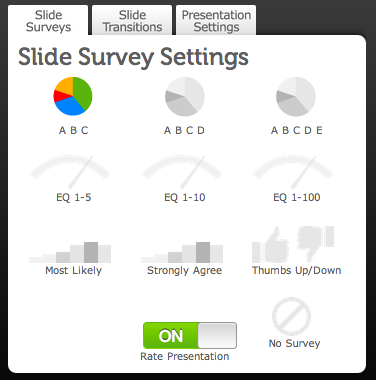
Screen Shot 2013-08-14 at 4.34.24 PMGlad you asked. A good teacher/trainer/presenter will start a nonlinear presentation by discovering what his or her audience needs. Ask questions. Invite interaction. SlideKlowd is perfect for that. The platform’s interactions offer a number of ways to ask questions and receive answers immediately. As a presenter, you can pre-populate your questions, or do it on the fly, right from Cast.


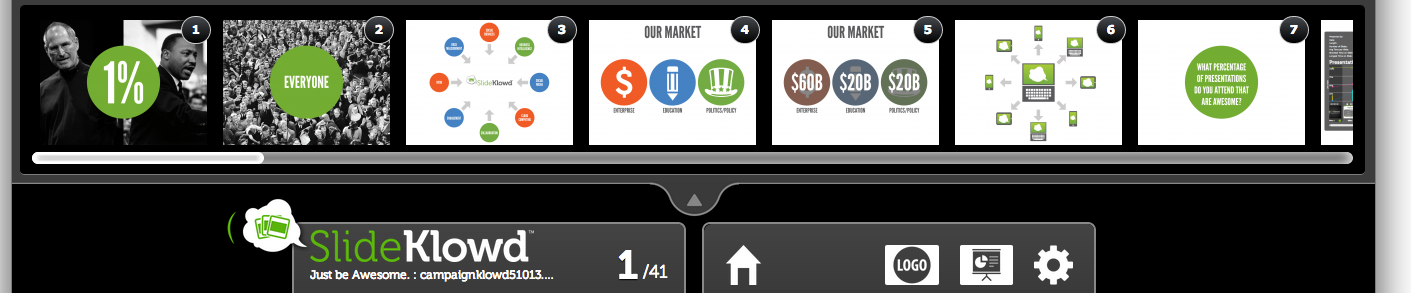
Once you know what the people want, give it to them. Skipping whole sections of your presentation is as easy as clicking the tab at the top of the screen in Cast. It pulls down a slider that displays your presentation content, in order. Clicking on any of the slides will take the third screen and the audience right past anything else before it. The crowd won’t even know you skipped anything.

Another perk to this is that if you don’t display a particular slide, analytics won’t be collected for it. That is, choosing to skip content isn’t bad for your SK rating.
Screen Shot 2013-08-14 at 4.46.04 PM

 So now you know what nonlinear presenting is and how SlideKlowd will make you look awesome doing it. We bet that your SK rating goes through the roof with all those satisfied buyers, employees or students who will love your responsive presentation skills.


Busted- Technology

busted_wk8This week’s Busted comic was inspired by our own Justin Foster- Once upon a time, most or all of the technology was with the presenter- clickers and PowerPoint animations made a speaker look AWESOME- the audience basked in the glow of the stage lights. As technology has become more mobile, an audience is illuminated by the glow of their own laptops, tables and smart phones and the technology is in the hands of the people.

Presenters, teachers, trainers and coaches, don’t get left behind. Use SlideKlowd for your presentations. Engage people who brought their technology to your event and keep them engaged in what you’re talking about. SlideKlowd keeps you looking AWESOME.

The Busted by Aristotle series is put together by our friends over at Ethos3. Check them out, they’re neat!

Introducing: Event Invitations

Are you sitting? You might need to before you continue reading. It’s hard to believe that something as awesome as the SlideKlowd platform could ever get any better. But then we go and do something like release a new set of features. It’s okay. Breathe. We’re excited too.

The SlideKlowd platform now has Event Invitations. That’s right, you can target your audience specifically, using their email addresses. This is great for classrooms, business meetings and any situation where a specific list of people needs to have access to your presentation. It also makes connecting to SlideKlowd easier for your audience.

Grab your list of attendees- students, employees or potential clients and log in to your Klowd.com presenter account (While you’re there, take note of the pretty new dashboard. Yeah, we like that too.). While you’re creating an event, clicking the Mail icon mail icon allows you to add all the email addresses you want. Clicking the Add button drops all those people into a list that can be checked one last time before clicking the Send button.

As the presenter, trainer or teacher, you have the ability to edit the message that your audience will see in the email. Your text can be as professional, fun or demanding as you like. We think that fun works better. Just click Edit Invite before sending the invitation out. Type to your heart’s content, make sure you save your message, then send your invitations out.

Invite-only Events

If you’re presenting to the Board of Directors or maybe your company’s C-Suite and the presentation includes information that you don’t want anyone else to see, make your event invite-only. That way, only particular email addresses are given access to the event. Then, even if Bob, the CFO mistakenly forwards the invitation to his neighbor, wife, or that annoying guy down the hall, only Bob is getting in.  invite only

Filter

If you’re working with a huge group of people, typing each individual email address can take up a lot of time. Another option is to filter who can participate by email domain. For example, if you’re training a thousand of your employees about the proper way to complete their TPS reports, you can limit who can log in to the presentation to users who have an @yourcompany.com email domain. That means that even with the correct event key, nobody can access a presentation using a Yahoo, Gmail, or even a Klowd.com account.

Screen Shot 2013-07-30 at 2.55.39 PM

Now you’ve got three awesome new ways to get the right people into your event. Each works in a variety of situations. Play around and see which works best for your style or your type of event.

How BYOD is Permanently Changing Corporate Events [Now on Demand]

BYOD-Header1Did you miss the SlideKlowd and InteSolv BYOD Webinar last month? That’s okay- we’ve got you covered and made the video available online.

You’ll Learn:

  • 5 surprising statistics on device adoption
  • BYOD and the rise of blended events
  • Preparing your facilitators and presenters for BYOD
  • Winning over your IT staff
  • 3 real-world case studies on BYOD and events

Get the video here here.

Busted- Like Magic


busted_wk7

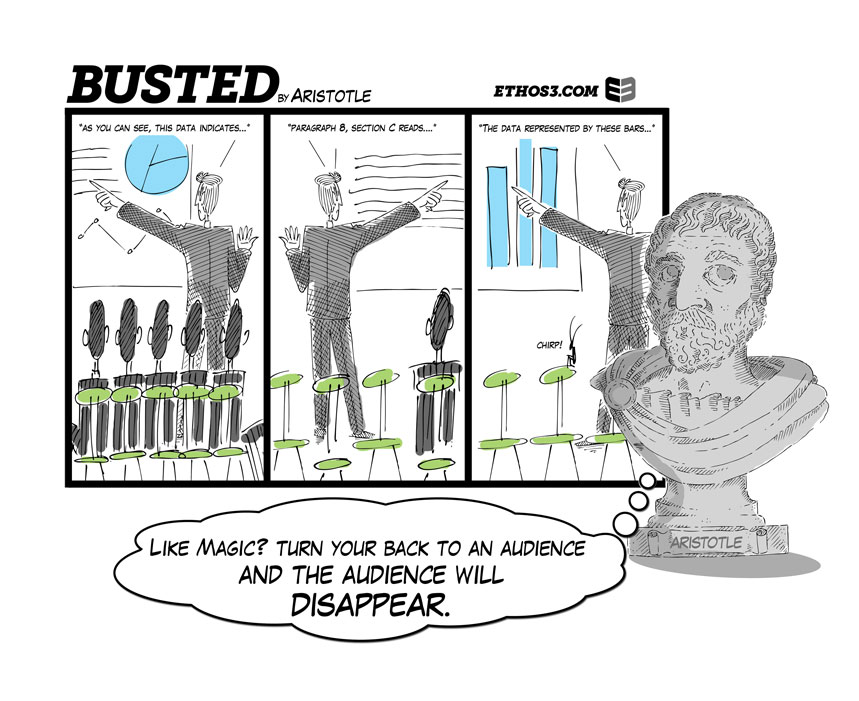
Some magic isn’t so fun. Seriously, if you want to engage your audience, you need to face them. And use SlideKlowd to push your presentation right to their laptops, tablets and smart phones. That way, they’re tons less likely to disappear on you.

The Busted by Aristotle series is put together by our friends over at Ethos3. Check them out, they’re seriously fantastic!