Category Archives: Project Profiles

Passive Listening Isn’t Actually a Thing

Workshop

Some of us talk back to the television. We must. We can’t simply sit still to take in the action and dialogue, but we have to share our opinions, express our outrage and vocalize all of the joy we find in whatever program or movie we’re watching. If we find ourselves not in front of a screen, but instead listening to some sort of speech or presentation, we might still insist on sharing commentary with anyone nearby who’d listen. But, not everybody is like that.

Some viewers are content to sit back and let the plot of whatever sitcom or romcom happens to be on wash over them. Some geniuses were paid to write this stuff, right? What could I possibly contribute to the story? Maybe this is fine, but that same kind of passive consumption has made its way into our workshops, classes, conferences and meetings.

Placid consumerism doesn’t belong in any kind of an educational environment. The notion of an audience quietly sitting, eating up every little thing some guru at the front of the room says seems natural enough to many of us, but that’s only because from childhood, most of us have been (unhelpfully) trained to not interrupt our teachers. We’ve been told that we can ask questions near the end of or after class. Work might be just as bad- nobody wants to speak over their supervisor or the company CEO, right?  Well, even if the smartest man in the world is speaking, simply sitting there listening to him is much less educational than you’d think. Benjamin Franklin said,

Tell me and I forget.
Teach me and I remember.
Involve me and I learn.

If you’re a teacher, trainer, coach or have any involvement in educating people at all, you want them to learn. Rote memorization might help an individual pass a test or get licensure, but when your pupil has to do something, they’ll likely need more than facts. They’ll need an understanding that is incredibly difficult to attain by listening alone.

So what do you do? You invite people to make comments. Ask questions. To actively engage the subject at hand, because that helps them think about it and understand it. Maybe talking back to the television is weird (it totally is) but the people who do it are engaging both characters and plot and they have a more impactful experience than the person who stays quiet the entire time. SlideKlowd helps you bring that out in your classes and audiences, minus some of the social weirdness.

The SlideKlowd platform provides new avenues for interaction, using a participant’s smart phone, tablet or laptop. Personal devices become the mechanism for not only consuming content, but responding to it as well. SlideKlowd allows users to interact with each other via the Comment Stream, Facebook and Twitter. They also have the ability to ask a presenter questions, which help them get what they need or want out of a presentation. Finally, the presenter can add any of the 11 different interactions in the platform to a slide to gather information from an audience or to increase interaction, attention and therefore retention of the subject.

*Photo by Heinrich-Böll-Stiftung: http://www.flickr.com/photos/boellstiftung/

Corporate Training and Development

Discover the Impact of Your Training Program

Organizations invest a lot of money into on-boarding new employees. Newbies need to learn about policies, benefits and culture, then complete a slew of paperwork. Add a whirlwind tour of the office, meeting the team and everything else that goes on and the question is, how much of that did they retain? Information about your dental insurance provider may not be a game-changer, but something like industry regulations regulations likely are.

The depth of a new employee’s understanding will become clear when 1- they do something horribly wrong and cost your company a lot of money, or 2- you start using SlideKlowd during your training. Our platform encourages interaction by creating a way for your trainees to ask questions and make comments. Trainers or educators can test for understanding by building questions into a presentation and getting real-time answers.

For example:

Thumbs


The presenter can watch as answers pour in, share with the room (or not) and view each individual response. If the person running the show is too busy to take it all in, they can look at responses later- they’re all recorded along with other presentation analytics. Based on responses, trainers can then change their approach or revisit topics that weren’t particularly clear.

Once everything is said and done, new employees are better-educated in the awesomeness of your company.

Continuing Education

SlideKlowd works in any setting that would normally utilize PowerPoint. Cloud computing enables the platform to push content to personal devices where employees can write notes, save them and the presentation to review both later. Cloud technology makes access to presentations or training as simple as connecting to the Internet and logging in at SlideKlowd.com.

Companies spread over multiple campuses have the ability to connect and train everyone simultaneously by setting up a third screen at each location. Regardless of distance, employees can login to the presentation using the same event key, set by the presenter. Use your regular conference call service to connect audio and your whole company will be ready to go! The benefits? Train large portions of your workforce at the same, implement company-wide policy changes with fewer meetings and effect change in your organization at an accelerated pace.

Location

Grading papers isn’t your deal. If it was, you would’ve become a teacher, right? But you still need to make sure that your employees are understanding and retaining information. SlideKlowd makes a great testing tool. Put your questions on slides and place corresponding interactions- multiple choice, true or false, scales to test your staff. Every individuals’ answer is recorded in our handy analytics that you can export in html or in an Excel spreadsheet. Just run through each person’s answers send them their grade and you’re done! And you didn’t have to print a thing…

analytics report

SAP Uses SlideKlowd at South by Southwest 2013

SXSW-AudienceWhile we didn’t have the bandwidth to attend this year’s South by Southwest in Austin, we were elated that SlideKlowd had a showing there at SAP’s interactive panel, Enterprise Enters the Apps Playground. Milja Gillespie, SAP’s Director of Mobile Product Development, orchestrated the panel discussion with help from the moderator, Matt Carrier, SAP’s Sr. Director, Mobile Strategy & Solutions, and panelists, John Arrow, CEO of Mutual Mobile, Eric Lai, Tech Blogger for Avaya and Alex Williams, Writer for TechCrunch. “I wanted to make the mobile session highly engaging, so I looked up the best audience interaction tools and selected a tool called SlideKlowd to make the session fun,” Milja remarks on SAP’s blog last week. The result: “The panel session was a great experience.”

Learn more about Milja’s experience using SlideKlowd here.

Commerce Director Sayer Transforms a Public Address into a Conversation

From the moment Jeff Sayer stepped into his new position as Idaho’s new Commerce Director in the fall of 2011, he has been working vigorously to “move at the speed of business.” His focus from the outset was to re-engage with businesses and the Legislature to accelerate Idaho’s economic development process. During the Boise Metro Chamber’s 2013 Annual Legislative Forum, Sayer used SlideKlowd to demonstrate his commitment to this focus of re-engagement and the theme of the event: Partners for Idaho’s Economy-Legislative and Business Engagement.

As part of the registration process, over 400 business leaders and state legislators were asked to download the SlideKlowd app on their smart phone, tablet or laptop. During his keynote, Sayer used the SlideKlowd platform to create real-time interaction with each audience member, distribute content and capture their feedback and opinions from their device. He encouraged the collaborative process by sharing all responses of survey questions on the large projection screen on the stage.

Through this connection, he not only created a more engaged and interested audience but also gathered data on responses to drive the agenda and key initiatives for the 2013 Legislative Session.

The Boise Metro Chamber of Commerce shared the results of questions he asked his audience in the February edition of their monthly publication, “Metro Connections”, as seen below.


For the complete February Metro Connections publication, go to http://www.boisechamber.org/cwt/external/wcpages/chamber/publications.aspx

Digital World Expo 2012: Project Profile

Problem

Microsoft Global Account Strategy Director for GP Strategies, Dennis Bonilla, was asked to be one of three keynote speakers for Digital World Expo 2012. Digital World Expo is an annual tech-media conference in Las Vegas that brings programming, advertising, development, media and IT professionals together for a 3-day, collaborative and educational conference and expo. Over 800 people attended the 2012 event. Bonilla wanted to get feedback from his C-level executive audience on where they thought digital media was headed and how they felt it was changing their business landscape.

Solution

Bonilla used multiple choice, likert scales, sliding scales and yes/no interactions to engage the audience, present the results to the audience and then discuss those results. Feedback was real-time and was used to inform Microsoft decision-making on the hot issues facing digital media leaders.

Outcome

“Slideklowd made my presentation immersive, exciting, and engaging for my audience. The audience’s enthusiasm and participation using SlideKlowd exceeded any other tool I have previously used. SlideKlowd made my job as instructor and presenter 100% easier and 200% more effective. I can’t imagine doing any future presentation without it.” Dennis Bonilla

GP Strategies’ E-European Director, Julian Stodd, is planning on using SlideKlowd for his presentation at MobiLearnAsia, a major conference and exposition focused on mobile learning and elearning.

Dreamforce 2012: Project Profile


Situation

Every year, Salesforce.com, one of the pioneers and leading innovators in the cloud computing space, hosts the Dreamforce Conference – an event that highlights SalesForce’s new products, clients and partners. This year, more than 90,000 people attended! One of the key events within DreamForce is the Investment Community Forum.  Managed by the SalesForce Investor Relations team, the Forum is attended by over 250 analysts, business journalists and other invited VIPs.

For DreamForce 2012, the SalesForce Investor Relations team wanted to do something different! CFO Graham Smith and David Havlek, SVP of Investment Relations were giving a presentation that was full of complicated charts, graphs and data. The complexity of the presentation and the early morning time slot meant the presentation had to be conducted in an exciting, informative and relevant way. In addition, the Investor Relations team wanted to capture real-time feedback and opinions, as well as measure comprehension levels on the information being presented. Finally, they wanted to be able to manage feedback and questions in an organized manner.

Solution

The presentation was given the final polish the night before the event and uploaded to SlideKlowd. The morning of the event, attendees were given instructions on logging in to SlideKlowd – with over 80% of attendees participating via SlideKlowd both in person and online. Graham and David used SlideKlowd’s “Clicker” app on an iPhone along with the Confidence Monitor app. As the presentation progressed, Graham and David were able to project real-time audience responses to the large screens as well as monitor questions and comments. At the end of the presentation, the “Save Presentation” feature allowed everyone logged in to the presentation to save the presentation to his/her personal device.

Outcome

Using SlideKlowd allowed Graham and David to give an effective, data-driven presentation while transforming the presentation into a lively conversation. The SlideKlowd team had worked with the Investor Relations team to ensure that the presentation was optimized for engagement. This effort was proven in the post-presentation analytics, where SalesForce was pleased to see the high-level of engagement, as well as follow up with questions and comments that were posted. The elimination of printing and binding had the added benefit of saving several thousand dollars and a tremendous amount of time. SlideKlowd has since been used by the Investor Relations team in other events and is being introduced to other teams within SalesForce.

13th Annual Idaho Private 75 Luncheon: Project Profile

Situation
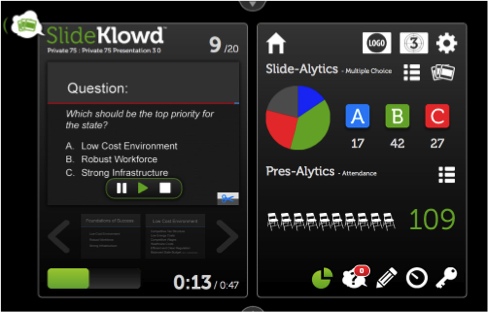
Idaho Department of Commerce Director Jeff Sayer understood he had a unique opportunity to hear the voice of major thought leaders when honoring the state’s top 75 private companies. After awards were presented, Director Sayer was asked to address the 300-person audience with a keynote speech on the state of the business climate. It was critical that he not only honor the Idaho companies that had excelled despite economic adversity but also gather and respond to the opinions of his contemporaries in the audience. He was there to listen and respond to business as well as reaffirm that State policy was in line with their needs. Director Sayer wanted to use his presentation to showcase local innovation and demonstrate cutting-edge technology.


Solution
Director Sayer used SlideKlowd to poll audience members on the state’s hot issues: jobs, healthcare, infrastructure, energy and taxes, and drove the content of his presentation based on their responses. At the same time, the feedback allowed him to either validate or reassess the direction the state administration was taking on current issues. SlideKlowd was asked to help craft Director Sayer’s presentation slides to create more engagement and stimulate the audience. With multiple choice, Likert scales and yes/no interactions integrated through the SlideKlowd platform, Director Sayer was able to capture and respond to real-time opinions of Idaho’s top visionaries and leaders. Using the homegrown SlideKlowd platform allowed Director Sayer to show relevance and innovation in a fun and interactive way while turning what would typically be a traditional, linear presentation into a dynamic town hall meeting.

Outcome
The Idaho Statesman was poised to do a spread on Director Sayer’s speech the following day but after seeing the presentation, the editor switched gears and wrote a front page story on SlideKlowd labeled “Idaho CEOs provide feedback via new app”. In the October 5 article Sayer is quoted as saying “We have nationally recognized folks [in Idaho] and Klowd is one of them.” In addition, the data that was gathered using the SlideKlowd analytics platform will be used to inform legislative policy decisions. Sayer commented afterwards “I couldn’t believe how easy SlideKlowd was to use. It is hard to imagine ever giving a presentation again without SlideKlowd”.

Dreamforce 2012: Use Case Scenario

SituationDreamforce Logo

Every year, Salesforce.com, one of the pioneers and leading innovators in the cloud computing space, hosts the Dreamforce Conference – an event that highlights SalesForce’s new products, clients and partners. This year, more than 90,000 people attended! One of the key events within DreamForce is the Investment Community Forum.  Managed by the SalesForce Investor Relations team, the Forum is attended by over 250 analysts, business journalists and other invited VIPs.

For DreamForce 2012, the SalesForce Investor Relations team wanted to do something different! CFO Graham Smith and David Havlek, SVP of Investment Relations were giving a presentation that was full of complicated charts, graphs and data. The complexity of the presentation and the early morning time slot meant the presentation had to be conducted in an exciting, informative and relevant way. In addition, the Investor Relations team wanted to capture real-time feedback and opinions, as well as measure comprehension levels on the information being presented. Finally, they wanted to be able to manage feedback and questions in an organized manner.

Solution

Dreamforce ScreenshotThe presentation was given the final polish the night before the event and uploaded to SlideKlowd. The morning of the event, attendees were given instructions on logging in to SlideKlowd – with over 80% of attendees participating via SlideKlowd both in person and online. Graham and David used SlideKlowd’s “Clicker” app on an iPhone along with the Confidence Monitor app. As the presentation progressed, Graham and David were able to project real-time audience responses to the large screens as well as monitor questions and comments. At the end of the presentation, the “Save Presentation” feature allowed everyone logged in to the presentation to save the presentation to his/her personal device.

Outcome

Using SlideKlowd allowed Graham and David to give an effective, data-driven presentation while transforming the presentation into a lively conversation. The SlideKlowd team had worked with the Investor Relations team to ensure that the presentation was optimized for engagement. This effort was proven in the post-presentation analytics, where SalesForce was pleased to see the high-level of engagement, as well as follow up with questions and comments that were posted. The elimination of printing and binding had the added benefit of saving several thousand dollars and a tremendous amount of time. SlideKlowd has since been used by the Investor Relations team in other events and is being introduced to other teams within SalesForce.

Digital World Expo 2012: Use Case Scenario

Digital World Expo 2012Problem

Microsoft Global Account Strategy Director for GP Strategies, Dennis Bonilla, was asked to be one of three keynote speakers for Digital World Expo 2012. Digital World Expo is an annual tech-media conference in Las Vegas that brings programming, advertising, development, media and IT professionals together for a 3-day, collaborative and educational conference and expo. Over 800 people attended the 2012 event. Bonilla wanted to get feedback from his C-level executive audience on where they thought digital media was headed and how they felt it was changing their business landscape.

Solution

Bonilla used multiple choice, likert scales, sliding scales and yes/no interactions to engage the audience, present the results to the audience and then discuss those results. Feedback was real-time and was used to inform Microsoft decision-making on the hot issues facing digital media leaders.

Outcome

“Slideklowd made my presentation immersive, exciting, and engaging for my audience. The audience’s enthusiasm and participation using SlideKlowd exceeded any other tool I have previously used. SlideKlowd made my job as instructor and presenter 100% easier and 200% more effective. I can’t imagine doing any future presentation without it.” Dennis Bonilla GP Strategies’ E-European Director, Julian Stodd, is planning on using SlideKlowd for his presentation at MobiLearnAsia, a major conference and exposition focused on mobile learning and elearning.