Monthly Archives: January 2013

Testing Retention through Multiple Choice Interaction

Ever trained on material and wondered if your audience got it? Do you have a distinct feeling that your audience is present in body but not in mind? According to a recent study by Bersin & Associates, U.S. companies spent $67 million on training in 2011. Training is expensive and what is even more expensive is having to do it multiple times. Here is one way you can use SlideKlowd to gauge if your audience is absorbing what you are teaching them.

Test them: add multiple choice questions throughout your training slidedeck to test whether your audience retained what you taught them. Audience members will use their devices to answer and you will know real-time whether they got it.

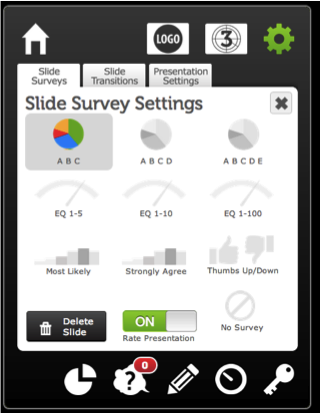
How? Under Settings/Slide Survey Settings, add one of three multiple choice options, as illustrated in the screenshot. Once your audience has responded you will see the number of people who answered correctly and those who didn’t.

Why? You now have several options based on audience responses. If everyone got the answer right, you can pat yourself on the back for a job well done and move on. If there were some folks who didn’t answer correctly, you can briefly re-explain the material or work with them separately at a break or after your training is complete.

Creating One-on-One Engagement Through Pitchbook Presentations

One of the challenges of presenting to a group is maintaining the connection you have with your individual audience members. Each member of the group is their own private island, forming opinions at every moment in your sales presentation. How do you connect and engage with individual audience members, while managing the crowd? Incorporate an industry standard engagement tool that professional salespeople have successfully used for years: a pitchbook.

A pitchbook is an interactive, visual aid that facilitates the sales conversation. The format encourages interaction, helps the sales person determine the client’s need for their product, and provides timely opportunities for the sales person to ask for the sale. Isn’t that how we want our sales presentations to work?

SlideKlowd helps structure your sales presentation into a pitchbook format to guide the conversation with your audience to create and maintain one-on-one engagement. This way you can communicate and build rapport with your audience, rather than just lecturing them about the features and benefits of your product. Here’s my SLIDE approach to creating a pitchbook presentation with SlideKlowd:

Exhibit 1. Example of a multiple-choice interaction.

Secure a sincere connection with your client. Be genuine. Take a few moments to connect and be real. Have fun. Ask them a humorous question to break the ice. In my presentation I give on LinkedIn for Business I start out with a multiple-choice question on how many degrees of separation is everyone from Kevin Bacon? That gets everyone laughing and warmed up.

Listen to their needs. Learn about what their biggest pain is. Share that you have done your research and then ask them to use the comment cloud to share what chaps their hide. Their responses will direct the conversation from this point forward so listen carefully and be prepared to respond.

Inform them about how your product will alleviate their pain. Here’s your chance to transform your

Exhibit 2. Three options for a sliding scale.

presentation from a linear transfer of information to a collaborative, engaging conversation. Ask them how they feel about your content using one of the three Sliding Scales (See Exhibit 2) and encourage them to ask questions, which you will then promptly answer. Address any concerns head-on. 

Exhibit 3. A Likert Scale used to measure commitment.

Determine their commitment to your product. I know this part sometimes bites but go ahead, ask them. Use the Likert Scale to ask them how likely they are to purchase your product (see Exhibit 3). You can now follow up with the interested parties and close the deal or work to convert the not-so-interested ones. For more information on using SlideKlowd to ask for audience commitment check out my blog post, Ask and You Will Receive.

End with a re-affirmation of their needs and how you will follow-up. At this point, the presentation is almost done and you are closing with another human connection. You are letting them know you heard them and you intend on following through with what you said you would.

Incorporating SlideKlowd and the SLIDE format into your sales presentation allows you to connect to those individual islands, gather their opinions, ask for their feedback and create one-on-on engagement that creates a truly memorable experience for your audience.

People We Like: Susan Avello

Susan Avello of Social Buzz Concepts is a real hoot. We love her raw sense of humor (one of her last blog posts was called ‘Working, living and socializing with those that annoy you’) and her excitement for everything from her two dogs to helping businesses and individuals build a powerful online brand. She is a social media maven who volunteers just as much as she works for pay.

She is the co-founder and speaker for Discovering Social and the voice behind HR Virtual Café. She is a regular contributor to the Society of Human Resource Management’s “Next” blog, as well as Chicago’s Women in Business on Examiner.com and a freelancer. In 2011 she received the Illinois Most Influential Women in Business Award from the Daily Ledger and NAWBO.

We recently asked her more about what makes her tick. This is what she said:

How do you serve your clients? Personal, professional and company branding, social job search strategy, social media strategy, development and management, social account creation, social business.

Who are your clients? Job seekers, executives, HR; small, med, large businesses and any individual that will listen.

What has been one of your biggest business successes to date and why? Through my individual branding and business social strategies I’ve gained a trusted, loyal online community that refer business my way, through strategic planning I’ve connected with key individuals in my target market and have been given tremendous opportunities to contribute to their organizations through regular blog articles, speaking opportunities and considered an industry expert in my field on a global scale.

What are you passionate about? I’m passionate about helping businesses, individuals, job search candidates and mostly VETERANS understand social business, social strategy, and the importance of online communities to reach maximum exposure in their businesses, job search and connections.

What do you read? I’m an avid reader both of books (yeah, I said books) and numerous online blogs and articles both in the business, social, recruiting, Human Resource, veteran areas that interest me and help in my continued knowledge and career development. Oh, and I love funny memes, stories, pictures and jokes.

Why should someone follow you on Twitter? Other than I’m the shizzle (ahem, I kid), I am highly connected, considered an industry thought leader, am involved in tremendous HR, social and business communities and individuals that continue to share amazing content through Twitter mixed in with my own content on Social Media in the Workplace, Technology, and BS. And I try to add a little (or a lot) of humor throughout the day – who doesn’t like to laugh? Follow her @susanavello.

Who do you like? I love to follow interesting folks in the social media space: Chris Brogan, Gary V, Jeff Bullas, Gini Dietrich, FosterThinking, SlideKlowd, and about 6,000 others (including a few current Bachelors and former Bachelorettes to add a little drama). 

PSFK Labs Features SlideKlowd in Their Annual Future of Work Report

PSFK Labs published a comprehensive report on the new ways people are working and the implications for business and the workers themselves. PSFK’s 138-page Future of Work report covers 16 trends across 4 broader themes, all imagined and illustrated by their creative teams.

One of those themes is visual collaboration: cloud-based democratic and visual interfaces, which allow large numbers of people, regardless of skill level, to collaborate on projects. We are honored that SlideKlowd was featured as a progressive example of visual collaboration  most notably to gather feedback and increase engagement in presentations. We had the opportunity to receive an advanced copy of the Report and found it packed full of thoughtful and meaningful research, backed up by numerous examples and statistics.

If you are interested in learning what the most progressive workplaces look like today, we would encourage you to order the report at http://www.psfk.com/publishing/future-of-work.

PSFK Labs is the consulting arm of New York-based PSFK.com; a trends research company that helps companies evolve their products, services and marketing communications to meet the changing behaviors and expectations of the global marketplace.

Using SlideKlowd with a Remote Audience

Have a remote audience you say? No problem. SlideKlowd works exactly the same as having a live audience with the exception of needing a phone bridge. Here are three simple steps to follow:

1. Host a meeting using your favorite phone bridge system.

2. Send your audience sign-in information for both SlideKlowd and your phone bridge system. Your SlideKlowd sign in information will look something like this:

Download SlideKlowd from Apple’s iTunes App Store or Google Play (Android Market). To view in a browser instead of the app, use t.slideklowd.com for a tablet or laptop or m.slideklowd.com for a smartphone. Note: The preferred browser is Chrome, Firefox or the latest versions of Internet Explorer.

3. Launch your SlideKlowd event and Abracadabra! It’s time for the show!