Tag Archives: presentations

Feature Update: Klicker

We like to keep things fresh. And clean. So, we updated the Klicker, to make running a presentation from your mobile device easier. Here are some of the changes we made:

photo copy 3

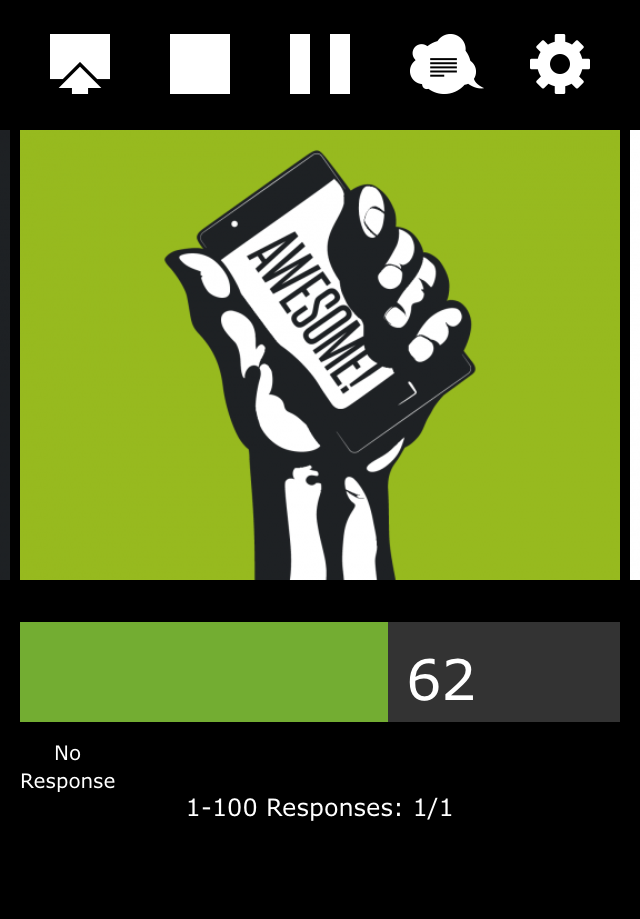
All new Layout: Find the functions you need at the top of the screen. First, if the third screen is displayed and the slide you’re currently on has an interaction, you can display the Slide-alytics using the display icon. If Third Screen isn’t active or your current slide doesn’t have an interaction, you won’t see this icon. It keeps everything clear, doesn’t it?

After that, You’ll see the stop, play/pause, comment stream and settings icons.

New slide navigation: Tap or swipe through your presentation like just like you used to, but now, your slides glide across the screen using an all new animation. Depending on the width of your device, you’ll see a small piece of the previous and next slides to the left and right of the one that’s currently displayed. For those of you who love it, we kept the Big Green Button. Switch between these interaction modes in the settings menu.

photo copy

Updated attendance, engagement, time and progress display: Click the Settings icon to access the main menu where you can do the usual things like resync your device, manage your interactions, view the Klowd Key, exit, etc. Find the useful information you need about your presentation conveniently on display at the top of the menu. It looks good, doesn’t it?


photo copy 2

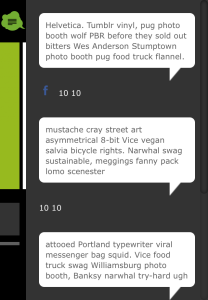
The Comment Stream: Originally, this was only available in the desktop presenter mode. Now you get it when using Klicker. Just click on the Comment Stream icon and the conversation will slide out from the right side of the screen. Posts to Twitter and Facebook are also labeled, so you as the presenter know how much social attention your presentation is receiving.

A few of the other changes include an updated login screen, total optimization of the app so it works more efficiently and several UI updates. We think you’ll like using the klicker even more with these changes!

A few of the other changes include an updated login screen, total optimization of the app so it works more efficiently and several minor UI updates. We think you’ll like using the klicker even more with these changes!

Facilitating Learning

Speakers are a necessary component to any conference. Any large event will always have at least one, but likely several big names or knowledgeable persons on stage or at the front of the room. But their role in and outside of the auditorium or conference room is changing. In the past, speakers have always been little more than information dispensers. They talk. People listen. When they’re done, people clap, take a break and get some more coffee, then the next speaker starts.

This lecture-style format is classic. It’s been around for a long time. And it’s about time we just kill it, bury it and start enjoying conferences again. Lectures are okay, but subjecting ourselves to a whole week of them that typically only includes one or two fantastically interesting people as well as a gaggle of mediocre humans will wear anyone out in the least fun way possible.

If you’re anything like us, you’re attending a conference because you want to learn. And have fun. You don’t want to be bored. Because nobody pays to be bored- or at least, ideally, nobody hands over their hard-earned cash for nothing.

The good speakers likely know they’re worth listening to. They’re headlining the conference and are half the reason a majority of the attendees bought tickets. Something that needs to be considered above communicative talent is learning styles. How many people are auditory learners? Various reports or studies indicate that around 30 percent of adults learn by listening. About 40 percent are visual learners. That means that even with an incredible personality behind the mic, there’s a chance of losing at least a third of the audience at one point or another. Chances are, it’ll be much more than that. Now consider the individuals who aren’t so talented at sharing their thoughts and ideas with a crowd. That likely gets worse.

If speakers want to educate, motivate and get some sort of response out of an audience, they likely need to look at themselves as learning facilitators more than speakers. What’s a learning facilitator, your ask? It sounds kind of pretentious, but actually, it’s a more humble approach to speaking.

Speaking is a manner of delivering content. A guru at the front of the room tells the rest of us how to think about _____. We’re not a fan of that, mostly because here at SlideKlowd, we like to think for ourselves. We know that you do too. It’s why we like you. The alternative to delivering or cramming information and knowledge down an audience’s throats is to help them discover information. It’s amazing to find out who knows what in a crowd of people. Information is so ubiquitous these days that every audience will have its experts.

As a learning facilitator, your job is to offer some information, but then draw some out of the crowd as well. Get the people to interact with each other and to reach conclusions. Of course, if someone says something stupid (we’ve all done it), you totally have the power to correct them. And you should, because you’ll be doing everyone a favor.

If you really want to win as a learning facilitator, use SlideKlowd. Here’s why:

1- Polls and interactions- Get your audience involved by asking them questions. Which leads us to #2…

2- Mobile- SlideKlowd is device-agnostic- it works on basically anything with a web browser, making participation easy. Because everyone is carrying their smart phone, tablet or laptop around with them, so you might as well utilize that stuff instead of allowing it to work against you.

3- Use the PowerPoint presentation you’ve had for years now. Or a new one. Upload as many as you want. Reuse them any time you need to, it’s great.

4- The platform engages all learning styles simultaneously.

5- The comment stream is a place where you can not only take the conversation online (for in-person and digital audiences) but every comment can be reviewed after the event, too.

6- Social Media- The audience can take the conversation to both the Twitter and the Facebook. Heck, they can even share your slides online if you want them to.

7- Questions- Few things are worse than some quiet person at the far end of an auditorium asking a question that nobody can hear. Responsible presenters repeat the question for everyone before responding, but not all speakers are responsible. The SlideKlowd platform allows attendees to ask questions and presenters to display them on the big screen.

8- Analytics- It was pretty obvious that you killed it during your presentation, but if you want proof, the SlideKlowd platform has post-presentation analytics that let you know who joined the presentation, when they joined it, and if they checked out at any point or another. And really, that’s just the beginning of what the analytics can tell you.

Getting the audience in on the conversation is also great for you- it takes off some of the pressure of being some amazingly awesome and entertaining speaker at the front of the room. People will forgive you for that a little, as long as they get what they want or need from your presentation.

The Second Screen

tonight

*Photo by Robert S. Donovan: http://www.flickr.com/photos/booleansplit/

How many times have you grabbed your tablet or laptop while watching one of the too many crime shows on television because you wanted to google something you saw to see if it was true? Did you watch the rest of the program with your technology in-hand, your attention vacillating between screens? If  yes, then you’re definitely not alone.

A while ago, television networks figured out that huge portions of viewers watch shows on their television- while using a laptop, tablet or smart phone in one way or another. Viewers had Facebook and Twitter open and sometimes visited program websites. Basically, people are able to consume content from more than one screen at a time. One response was to give shows, even individual episodes their own hashtags encouraging audiences to interact with each other during programming. Some websites began including the supplementary content they thought people would look up on their own anyway.

The great thing about this technology is that it’s mobile. Very few people sit at a desktop while watching television, it’s just not as comfortable as watching our favorite shows from the sofa, recliner or bed. Nearly everybody who’s got a web-enabled mobile device brings it everywhere with them. We’ve also been seeing these devices at lectures, presentations, sporting events, political rallies- you name it- for years now. And as event planners are wising up to harness this technology, we’re seeing the second screen come in to play in all kinds of places.

Have you ever been to a sporting event and had lacked a decent view of the jumbotron or whatever giant(ish) screen the venue used for replays and all the extra facts about a player or the game itself? Frustrating, isn’t it? Wouldn’t it be better if you could just glance at your phone and see what’s going on? Political events aren’t any different. We’ve all listened to someone that we support and have still felt the need to look something up just to make sure they weren’t exaggerating, even just a little. How would you, as part of the voting public feel if a candidate pushed sources from his speech directly to your phone while speaking? Would that increase your trust in them and their causes? It’s better than trying to remember what to look up when you get home, isn’t it?

TEDxHelsinki: audience

*Photo by Mikko Reinikainen: http://www.flickr.com/photos/mtreinik/

This is the second screen. It’s supplementary in so many situations.

2013 brought about a huge adoption of BYOD (Bring Your Own Device) in the workplace and at events. People prefer to use the technology they’re familiar with. Thus far, predictions are pointing toward increased use of audience devices to get people engaged during events in 2014. Unfettered access to wifi and charging stations have already become mandatory at any noteworthy event, because nothing’s worse than trying to work with substandard wifi or panicking over nearly dead devices then fighting with a perfectly nice stranger who needs the same outlet you do for exactly the same reason.

The way we experience events (even remotely) will change as planners think ahead and encourage us to engage online- realtime. Really, there are only two ways to engage users on their own devices. Planners and presenters can enable them via web browsers on devices or using apps. A differentiator in which will succeed and which won’t is the ease of getting connected. Few people will jump through hoops to get connected- even during an event.

As a second-screen app, SlideKlowd approaches this a few different ways.

First, if the event required registration and the event planners know their audience’s email addresses, they can simply upload all of them into the platform (with minimal effort) and send every attendee on their list an invitation. Using this, any participant can get content sent to their “second screen” with just one click.

Screen Shot 2013-12-31 at 10.52.24 AM

Otherwise, participants can join a presentation by going to join.slideklowd.com, logging in and using the Klowd Key that was created by the presenter or event planners. It’s that easy. Event planners have other options to make sure the right people are joining presentations by making them invite-only or filtering by participant email domain (@yourcompany.com, for instance). SlideKlowd offers a number of features to compliment the second-screen nature of the platform, too. Because as event planners are still learning, engagement is more than offering more content- it’s also hearing what your audience has to say.

People We Like: Scott Schwertly of Ethos3

Ethos3_logo_smallerScott Schwertly is the author of How to Be a Presentation God and CEO of Ethos3, a Nashville, TN-based presentation boutique providing professional presentation design and training for national and international clients ranging from Fortune 500 companies to branded individuals like Guy Kawasaki.

If Scott is not working with his team building presentations, you will find him in the pool, on the bike, or on a long run. Scott lives in Nashville, TN with his wife and three dogs. He has a B.A. and M.B.A. from Harding University.

How do you serve your clients?
We live in a business climate right now where the art and science of presentations are getting abused on a daily basis. The core purpose and reason for Ethos3’s existence is to empower presenters who struggle with building, designing, and delivering presentations. Our goal is simple: to help our clients create positive experiences through their presentations.

Who are your clients?
Our clients range from the Fortune 500 companies to the entrepreneur who is building their very first VC pitch. We provide presentation design and presentation training for some of America’s most admired brands as well as for some of today’s brightest thought leaders.

What has been one of your biggest business successes to date and why?
We take immense pride in our ability to serve our clients like no other presentation firm. Taking inspiration from the work of Michael Gerber, we have been able to streamline all of our systems making us “franchise worthy” without being a franchise so that our focus and energy isn’t on processes but rather on producing creative work.

What are you passionate about?
Presentations. Period. It’s what we do day in and day out. We are continuously trying to improve and find innovative ways to build and design the most creative and compelling messages and visuals on the planet.

What do you read?
I’m a voracious reader and am currently on track to hit 52 books in 52 weeks. My personal favorites are the works of Michael Gerber, Seth Godin, Daniel Pink, and Steven Pressfield.

Why should someone follow you on Twitter?
If you are looking for some of the best presentation tips and tricks, I highly suggest following our Twitter account at @ethos3. We blog 3-5 times a week so there is always useful information that can be learned and utilized.

Who do you like?
We happen to be big fans of Daniel Pink. His theories on work, motivation, and the future of right-brainers inspire and encourage us. Plus, he’s a fantastic presenter as well.

Ethos3

Nonlinear Presentations & SlideKlowd

If you remember much from school, you’ll recall that when writing papers or speeches, a clear outline helped you accomplish your goal. The typical format was something like

Thesis
Supporting argument #1
Fact
Fact
Supporting argument #2
Fact
Fact
Blah, blah blah.

Does that look familiar? That structure is well and good for high school or maybe university, but it’s intensely boring and really won’t do for an important pitch or for training your employees. This technique is probably where Death by PowerPoint started. You aren’t trying to bore your staff into quitting, are you?

Here’s the good news: you have content that’s worth sharing. And believe it or not, your audience needs or wants your information and ideas. Just maybe not all of it. How can you give them the content they need and cut out all the unnecessary, potentially boring stuff? By kicking the linear format.

Nonlinear presenting is a responsive approach where a trainer, teacher or speaker moves freely through their content based on what their audience needs. It involves asking questions and listening to the people in front of you.

Some Benefits to Nonlinear Presenting:

1- You give your audience control of their time. Sure, you’re up at the front of the room and you’ve got the mic, but your event/class/meeting isn’t really about you. It’s about the people. Besides, they outnumber you, so give them what they want. Let the crowd decide what you talk about based on their needs and interests. They’ll eat up every word you say and you’ll look like a champ.

How do you do this? Start your talk by asking questions or testing their knowledge. (Hint: ask questions all the way through your presentation.)

2- Capitalize on the moment. If halfway through your sales pitch, your audience decides to buy, you don’t ask them to sit through the rest of your presentation. You jump to the end and get a contract in front of them quickly, before they somehow decide otherwise. The same is true with any call to action- convinced people don’t need to hear your persuasive argument, they need to be instructed and freed to act.

3- Use time effectively, or use less time. Cutting all the unnecessary stuff out of your presentation frees up time to elaborate on important topics. Or it helps everyone get to lunch a little early. Your audience will love you for both.

4- Use the same material for different groups- Have you ever sat through a presentation that you knew was created for someone else? That’s annoying. It’s evidence of presenter laziness. He or she should know that one size fits all doesn’t apply to presentations. The trick is having the flexibility to move around to whatever content is necessary.

5- You’ll feel better. Ultimately, your presentation wasn’t about you- we already covered that. But when you know you aren’t wasting anyone’s time and that your audience really liked your content, you get to walk away from an event feeling like a boss.

So, you’re wondering, how does SlideKlowd help with this?

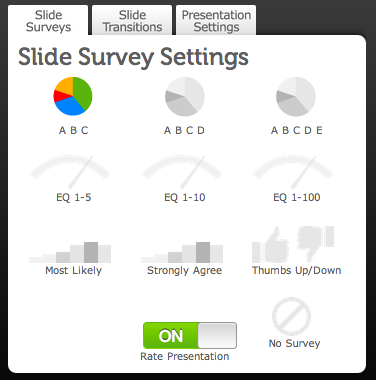
Screen Shot 2013-08-14 at 4.34.24 PMGlad you asked. A good teacher/trainer/presenter will start a nonlinear presentation by discovering what his or her audience needs. Ask questions. Invite interaction. SlideKlowd is perfect for that. The platform’s interactions offer a number of ways to ask questions and receive answers immediately. As a presenter, you can pre-populate your questions, or do it on the fly, right from Cast.
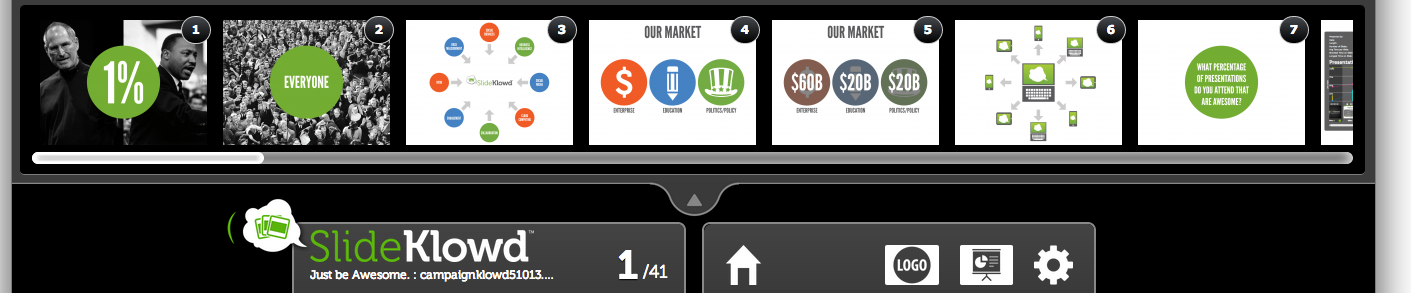
 

Once you know what the people want, give it to them. Skipping whole sections of your presentation is as easy as clicking the tab at the top of the screen in Cast. It pulls down a slider that displays your presentation content, in order. Clicking on any of the slides will take the third screen and the audience right past anything else before it. The crowd won’t even know you skipped anything.

Another perk to this is that if you don’t display a particular slide, analytics won’t be collected for it. That is, choosing to skip content isn’t bad for your SK rating.

Screen Shot 2013-08-14 at 4.46.04 PM

 So now you know what nonlinear presenting is and how SlideKlowd will make you look awesome doing it. We bet that your SK rating goes through the roof with all those satisfied buyers, employees or students who will love your responsive presentation skills.