Tag Archives: Presentation

Less is More

clock“I wish that presentation was longer.”

Said no one. Ever.

Too many meetings, pitches, classes and workshops eat up more time than they really ought to. All of us movers and shakers have stuff that we need to get done. We have industries to disrupt and masterpieces to finish. Then there are naps to be had. And the rest of life that’s waiting outside of the conference room, auditorium or classroom.

So, when it’s your turn to share your vast knowledge of molecular physics, quantum chemistry or celebrity gossip, you have the opportunity to do your audience a favor. Maybe more. We’ve got a couple of insights to help make your presentation succinct but impactful.

Less is more
Probably every person who’s ever presented or taught is guilty of trying to fit too much into whatever amount of time they have. We’re passionate about things and want to share every drop of knowledge we have about a subject. We tell ourselves, “The people need it!” And we want to make sure they understand it all, too. So we stuff too much into a presentation and then either go over on the allotted time or have to cut some really awesome stuff out when people get up and start to leave because they have to get to that next session, class or presentation.

How many points are you trying to make? Keep it at about three. Yeah, that that isn’t very many. But if you want your audience to remember everything you’ve said, you’ll keep it simple.

Focus
Moby Dick is a great story- but a terrible (awful, horrible, annoying) book. Know why? Because Melville thought it was appropriate to write whole chapters about the migrating patterns of sperm whales, crows nests and other stuff that didn’t drive the story. Get rid of the asides that not only distract, but consume valuable time.

People check out when you go off on unhelpful tangents. We have proof. The SlideKlowd platform records and measures engagement using your audience’s smart phones, tablets and laptops. When an audience member connects to your presentation using SlideKlowd, the platform knows when their devices go idle or go elsewhere. Because that’s what we do when we’re bored- we grab our mobile technology and check our email, Facebook and watch funny cat videos.

After you’re done with your presentation, you can look at where audiences were most- and least engaged. Adjust your presentation accordingly and you’ll find that people listen, engage and learn more. Because we think you’re actually really good at this, you can also monitor engagement right from the presenter control panel. If you see the numbers start to drop, maybe you should consider moving on to the next topic, or asking your audience to help you adjust your presentation right then and there.

Adjust
If you have to fill four hours with your knowledge, ask the audience to direct your talking points. That way, they’re not hearing things they already know, but they’re getting new or challenging information. The SlideKlowd platform helps you do this in a number of ways. First, they can ask questions or make comments using their personal technology. As the educator or presenter, you’re free to respond to the good ones and ignore the dumb ones.

If you want to have a little more control over the situation, poll your audience. Ask questions like,

How much do you know about _____?

Does your job require you to know about _____?

Which of the following most interests you?

A) _____

B) _____

C) _____

D) _____

Would you rather I share about  _____ ,  _____ or _____?

The best presenters will ask questions like these throughout their presentations. The SlideKlowd platform even accommodates spur of the moment ideas by enabling a presenter to add an interaction while running a presentation. That way, you can always keep things interesting. It’s kind of like those choose your own adventure novels.

Ted talks are never very long, but so many of them have left lasting impressions on the people who’ve listened to them. So don’t be afraid to go short. But remember, SlideKlowd has all kinds of ways to help you and your audience make the most of the time you have together. 

*Photo by Michael: http://www.flickr.com/photos/29254399@N08/

What About the Zeroth Rule of Presentations?

Too often, professionals don’t think about some of the most basic necessities of a presentation. Like… whether or not everybody in your venue will be able to see the screen. This leads to small or awkward fonts, busy backgrounds that camouflage text and the problem that S. M. Ali Eslami addresses in his article, The Zeroth Rule of Presentations.

He was attending a conference and encountered a problem that most of us have experienced in poorly designed lecture halls and even movie theaters. There were people in front of him. Some of them may or may not have been giants or had huge heads, which obstructed his ability to see everything that was on the screen at the front of the room.

blocked preso

(Photo credit: S. M. Ali Eslami)

Eslami noted that he was able to sit up straight and lean one direction or another in order to see the blocked information, but that he wasn’t likely to keep that up for an entire presentation. His solution? Put all the important stuff at the top of your slide, followed by secondary information.

His suggestion is admirable- put function above all else, for the sake of your audience. The name of this idea, The Zeroth Rule is either a nod to science fiction written in 1942 or some crazy principle from thermodynamics. We really hope it’s the former, because killer robots are much more fun than heating and cooling.

With SlideKlowd, this isn’t even a concern. Or, it’s less of a concern because the SlideKlowd platform gets your audience up close and personal with your presentation. That second screen in the palm of their hands couldn’t be blocked by the tallest man in the world- unless he was being a jerk.

SlideKlowd connects your audience to your presentation using their smart phones, tablets or laptops- the stuff they’re carrying around with them anyway. All they need is access to wifi. The benefits? You get to use all the space on your slide as you see fit. Eslami’s suggestion is great, but it also provides ample opportunity for ugly slides and wasted space. Your employees, students or audience deserve better than that. Some of them might even demand better. We like those people.

There are other benefits- viewers or participants have the ability to save your presentation (along with any notes they took) to review it all later. If you’re really about instructing or training people, this is fantastic- and doesn’t even require the effort of emailing your slides to everybody.

Audiences can connect from anywhere. We think this is the best solution for a traditional conference, but it’s also killer at teleconferencing. Share your content and communicate with people all over the place using the SlideKlowd platform. You’ll just need to connect using your favorite audio conferencing service.

You took the time to design slides and show off all that super awesome knowledge that you have. The last thing you want is some conference participant sharing a blurry, washed out photo of it with the rest of the world. The platform’s social integration features take care of that. Viewers have the ability to share individual slides from your presentation on both Twitter and Facebook without being left at the mercy of their photography skills, poor lighting or the quality of the camera on their phone.

We think that Eslami’s advice is perfect- do what you need to in order to convey as much information to your audience as possible. They paid for it, didn’t they? We’d encourage you to use SlideKlowd though, instead of cramming everything into the top half of each slide- because frankly, that’s a little weird. Place your presentation and information in your audience’s hands- there, it’ll help you speak/teach/present/train and it will help them to see what’s going on- even if there’s a super tall person sitting in front of them. 

A Benefit to Asking Questions

One of the best ways to become a better speaker, teacher or presenter is ask questions. First, it gives your audience, classroom or co-workers an opportunity to contribute. This changes the presentation from a monologue into a conversation. Everybody prefers conversation to lecture. Second, it directs your presentation to the material that your audience, coworkers or class wants. It also helps you learn and grow.

Asking questions also enables you to collect informal content. This is the stuff that you want, because it points to what you did well, what people are interested in and helps a presenter, teacher or trainer infer what they could have done better or even what their audience isn’t interested in.

Two Types of Content
There are two kinds of content. The first is formal. Your formal content is the stuff that you create or curate. It’s your PowerPoint presentation, your notes and any other media that you include when you train, teach or speak to a group. The informal content is what happens during your class, presentation or event. It includes the human reactions to your content. It’s the way people answer those questions that good speakers ask. It’s how often a person in your audience checks out to do something else. This stuff is pure gold. 

Informal content hasn’t always been easy to measure. Speakers had to really pay attention to what was going on in an audience to understand when people were paying attention, when they didn’t like something and if they’d checked out or not. That kind of effort sounds exhausting and truly only works for small gatherings. Even the greatest presenters probably didn’t have a great way to record that kind of information, Either.

SlideKlowd Collects Informal Content
SlideKlowd pushes content to mobile devices- smart phones, tablets and laptops. This is fantastic because an audience gets up close and personal with what the presenter wants them to see. The platform also gives presenters the tools to ask questions and effectively collect answers, using the same devices that viewers are using to connect to a presentation.

SlideKlowd also logs when a person joins a presentation, when they cut out for a while and if they choose not to respond to a question. The platform also records questions, comments and social media interactions. All of this stuff paints a clear picture of how an audience liked or disliked, maybe even slept through a presentation.

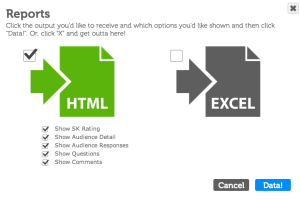
The platform presents all of this data in our analytics. Presenters or trainers have the option to view a sexy html version, or they can be downloaded in an Excel format. Both are incredibly useful.

Screen Shot 2013-09-05 at 8.50.12 AM

Informal Content Matters
This is a lot of information, but it’s all incredibly useful. Presenters, trainers, teachers executives and anybody else who has to speak to a group of people for any reason can use this information to improve their presentation skills or their presentation. Managers can use it to track employee engagement in training. The sales department can use SlideKlowd to gage potential buyers.

Busted- Insomnia

busted_wk6


If you give your audience something to do, they’re about a million times more likely to remain conscious. SlideKlowd enables your audience to vote, ask questions, make comments and take notes. All on their phone, tablet or laptop. Keep them involved enough, and they won’t feel so compelled to take a nap.

The Busted by Aristotle series is put together by our friends over at Ethos3. Check them out, they do great work!

People We Like: Dr. Michelle Mazur

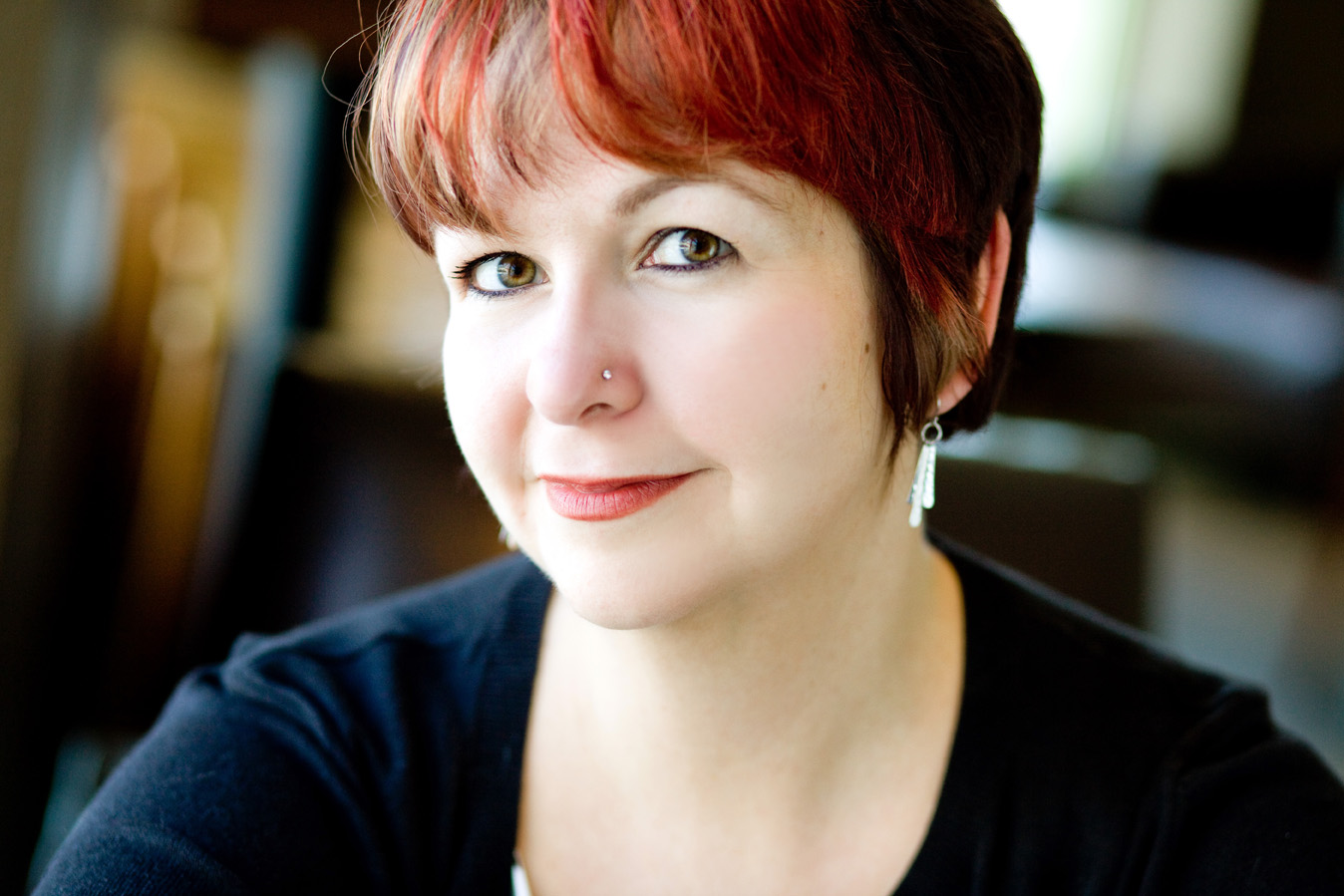
11Speech Coach and Presentation Skills Trainer Dr. Michelle Mazur guides driven-to-succeed business professionals and independent business owners to ignite the smoldering fire within to speak up, speak out and make their impact – one compelling presentation at a time.

With her fiery red hair and quirky unconventional presentation style that has delighted and inspired audiences from 10 – 10,000, Dr. Michelle believes that everyone can make a big impact by showing up at their authentic audacious best.

We recently asked Dr. Mazur to share a little more about herself:

1.     How do you serve your clients?

By helping my clients rock their presentations of course! My clients come to me with a wide variety of presentation challenges, but the one I see the most is the fear of public speaking. I help those clients find strategies that work to tame their fears. Then we can focus on crafting amazing content that fosters a deep connection with their audience. We also laugh a lot along the way. Speaking is stressful enough – coaching should have an element of fun!

2.     Who are your clients?

My clients are mainly small business owners and entrepreneurs. I cater to the little guys who want to give the big guys (Fortune 500 companies) a run for their money. My clients are smart, passionate and want to change the world. I love helping them make their dreams reality.

3.     What has been one of your biggest business successes to date and why?

My biggest business success is watching my clients grow as speakers. I helped one client recover from having a massive panic attack during a presentation to giving presentations for her new job in a calm, cool and compelling manner. One of my clients made a former First Lady cry with a moving keynote speech. My success is all about the amazing clients I serve.

4.     What are you passionate about?

Storytelling, TED Talks, my 2 cats who are a little nutty and obsessive, Duran Duran, zombies, zombies who resemble Duran Duran. Is this getting to weird? Seriously, one of my biggest passions is helping people find their voice as speakers, writers or bloggers. Letting your personality shine through, telling your story and embracing what makes you unique is the only way to standout in a competitive world.

5.     What do you read?

My nose is always stuck in a book. The Fire Starter Sessions by Danielle LaPorte changed my world. I really loved Made to Stick and Switch by Chip and Dan Heath, Enchantment by Guy Kawasaki, The $100 Startup by Chris Guillebeau. Right now, I am taking a break from non-fiction and diving into Shadows of Night by Deborah Harkness because who doesn’t love a vampire/witch love story?

6.     Why should someone follow you on Twitter?

I love sharing great content on speaking, leadership, blogging, social media, SEO. I’m fortunate to be connected with many great bloggers. Additionally, I love to chat so ask me a question about speaking or any of my passion, and we’ll have a chat! If you want to read some amazing online content or chat about random popular culture references, follow-me.

7.     Who do you like?

Ash Ambridge at The Middle Finger Project – her writing is full of awesome (she’s got the most distinct voice that I’ve ever read) and her blog is helpful to any small business owner. Srinivas Rao at Blogcast FM – he’s an excellent interviewer, and his podcast, BlogcastFM, provides some of the best free information about being an online entrepreneur. My fiance, Glenn, who supports me in making the world a better place one compelling presentation at a time.


Busted- Fear

The team over at Ethos3 recently started a ten-week series, “Busted by Aristotle” and we think it’s great. Ethos3′s voice of reason, Aristotle- might be old, but when it comes to communicating, he knows his stuff.

busted_wk1

Audiences will be on their phones (tablets, laptops) no matter what. Use that to your advantage and keep them involved with SlideKlowd.

Created by Ethos3. Check them out, they’re neat!

How do you know that your audience is engaged?

You’ve prepped your audience-and got everyone connected to your SlideKlowd event on their smartphones, tablets or laptops. You’ve got the Event Key displayed on your Third Screen and you’re about to blow their minds. But you wonder, “How will I know if they’re paying attention?”

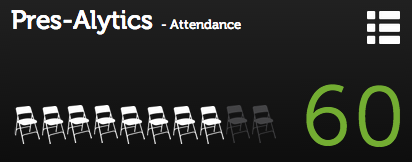
In the Presenter Dashboard, notice the Pres-Alytics (Attendance) area. There you’ll see a row of ten chairs and a green number. The green number is the total number of people have logged into your event.  If you have an audience with web-enabled devices, this should close to the same number of people in your session.

Screen Shot 2013-06-04 at 2.39.33 PM

The chairs indicate what percentage of your attendees are currently engaged. As the image shows, if 80% of the chairs are lit up then 8 of the 10 chairs will be lit up.

Who’s Engaged?

We know what you’re asking: how do we know if a person is or isn’t engaged? It’s not quite magic, but it’s as close as any developers could get.  Every two seconds, we send a “ping” to each device that is logged in. If they are still logged in, then all is well. If not, then after 30 seconds of inactivity by an attendee, it will be reflected in the Pres-Alytics row of chairs.  Note that every disengagement by an attendee is tracked in the analytics.

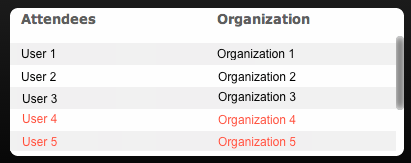
If you want to know who is or is not paying attention, just click or touch the list icon just above the green audience number to see the name of each person who has logged in to your event. If they’ve completed their audience profile, their organization will be displayed as well. Any person whose display name is in black is currently engaged. The names in red have disconnected from the presentation or need to wake their device back up.

engagement

Other Ways to Use Pres-Alytics:

As we described, the Pres-Alytics is a real-time and at-a-glance view of engagement.  What else can you do with this info?

  • You can use it to monitor the over-all engagement level of the session.  If you notice the chairs start to go dark, we suggest that you add some interaction on the fly – or break out your “RiverDance” routine.
  • If you are in a compliance or training-type presentation, you can use the Pres-Alytics to report on participation and engagement level.  Then you can call them out by name and tell them to pay attention!
  • If you are giving a sales or motivational presentation, you can monitor the Pres-Alytics to be sure your call-to-action is at the height of emotion.  If all the chairs are lit up, ask for the deal, the donation or the vote!

After Your Session

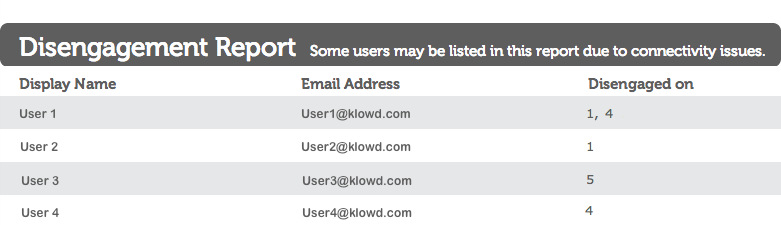
After you’re done presenting, take a look at the disengagement report in the Presentation Analytics to see what slide(s) they disconnected on. Consider your content: your slide, what you said, whether or not you had an interaction. Based on this data you can adjust and improve your next presentation.

Screen Shot 2013-06-05 at 3.17.06 PM

Build a Relationship with Your Audience

An audience might be gathered to listen or learn, but often, many people want to be heard, too. SlideKlowd’s audience engagement platform helps speakers know what their audience is thinking, so listeners don’t have to send a “Dear John” letter like Dr. Michelle Mazur wrote as she explains what not to do in communicating.

Read Dr. Mazur’s letter here.


How Our CMO/Co-Founder Uses SlideKlowd in His Presentations

In addition to being the CMO/Co-Founder of Klowd.com, I am also a presenter and facilitator. I’ve used SlideKlowd in about 30 speeches, workshops and classes (not including countless demos and sales presentations related to SlideKlowd!). My topics have been on business and personal branding, engaging Gen Y, tech trends, professional selling … and occasionally bacon.

I thought it would be helpful to share how I use SlideKlowd as a presenter.

I start by determining the intent of my presentation. Am I giving a keynote?  Teaching a class? Giving a sales presentation? This helps me focus on the kind of engagement and interaction that is needed as I prepare my content. I then build my content based on the following areas:

  • Measurement:  What data do I want to collect from the audience and how do I want to measure it?  In essence, I build my presentation deck by working backwards from the SlideKlowd Analytics report.  Here’s a post and video on that if you haven’t seen our Analytics tool.
  • Interaction:  What do I want from the audience?  Using the interactive widgets in SlideKlowd, I can ask for opinions, test knowledge level, conduct self-assessments, solicit ideas and much more.  I can also ensure comprehension and interest level by simply asking them!  I can also manage questions and comments through SlideKlowd.
  • Call-to-Action:  What do I want the audience to do? Of course, this is contextual to the type of presentation. If it’s a sales presentation, I want them to buy. If teaching a class, I want them to learn. Regardless, I build the call-to-action into the presentation. By creating an “ask” at the height of emotion, I’m much more likely to get the desired outcome.

After my presentation, I run the SlideKlowd Analytics Report to check engagement levels, SlideKlowd rating, slide-by-slide responses and more. Based on the data provided, I can adjust the content for the next time I give the same speech.

SlideKlowd is a diverse tool that can be used in any situation where you want to deliver content, provide interaction and measure engagement – but that’s how I use it as a presenter! Be sure to check out our blog. We post a ton of tips, stories, case studies, etc.

Find me and follow me: https://www.vizify.com/justin-foster