Tag Archives: Technology

Easier Invitations

A responsible event planner ought to shoulder the effort and responsibility of getting audience members connected and engaged in a presentation. That is, if they want people to connect. Of course, there will always be the attendees who are excited to try anything new- some of them would jump through flaming hoops in order to engage. We like those people. But, they’re a minority among meeting and conference attendees.

For the rest of the people, getting connected to whatever technology or participating must be easy. Because people are… well, sometimes we don’t want to exert ourselves, do we? That’s the nice way to say it, right? It’s on you, the presenter, planner or leader to help the rest of the auditorium to participate in a presentation.

Don’t Worry. We’ve got your back.

If you’ve got 800 people attending your conference and you want as many of them as possible to engage during your opening and closing sessions, that’s as simple as uploading a list to the SlideKlowd platform and emailing each and every one of them an invitation. Don’t worry. It’s easy. Just take your attendee list, drop it into the template .xlsx file provided on the Invitations page in SlideKlowd, then upload it to the SlideKlowd platform. The only required information in the document is an email address, but first and last name, organization and a custom ID code are also information fields in the spreadsheet. The custom ID code would be something like a student or employer ID number.

Screen Shot 2014-01-28 at 12.06.50 PM

Because it’s awesome, SlideKlowd removes any duplicates from the list. Once the information has been uploaded, you have the option to review each and every person’s information before sending a mass email out all at once. Once it’s sent, you can search by name to determine whether or not particular individuals were included on the list.

Screen Shot 2014-01-28 at 2.48.15 PM

We’ve put a nifty email together that can help users do a couple of things. If they’re using SlideKlowd for the first time and don’t have an account, they can create one (with complete, accurate information) before joining a presentation. All they have to do is scroll down in the email and click Edit. If the attendee hasn’t participated in a SlideKlowd event before and they don’t have the time to make sure their account is accurate, all they have to do is click Join. The platform creates an account for them and emails a temporary password to the address used for creating the account.

If you want to include your own special instructions or details in the email, that option is available on the invitations page. Simply click Edit Invite. Type to your heart’s content, then make sure to save your edits. You also have the option of changing who the invitation is from- just in case you aren’t actually the person doing the presentation.

The great thing about smart devices is that your audience will receive the emailed invitation on the same device they’ll likely use to connect to a presentation. All because you went ahead and made engaging so much easier for them. Good job. You deserve a donut and some coffee.

Collecting Customer Feedback

“Customer feedback is one of the most valuable resources a company can collect — and one of the hardest to gather.” – Jeremy Caplan in an article he wrote for Forbes.

He goes on to elaborate on tech savvy companies who’ve figured out how to collect valuable information that has remained elusive to companies for years. SlideKlowd made the cut. Read more…

Making the Multi-Screen World Work for You

Screen Shot 2013-09-13 at 10.00.11 AMA recent report indicated that tablet ownership among adults has increased from 18 to 34 percent in the last year. That’s a huge jump in twelve short months. As more and more people are buying tablets and smart phones and taking them everywhere with them, technology has been a bit of a question for communicators, trainers and teachers who believe they have to compete with attention-grabbing devices during classes, presentations and any other event involving crowds of people. 

It’s okay. Embrace the technology.

First, viewing potentially distracting technology as a competitor for attention is basically admitting defeat before you start. Smart companies and individuals are finding ways to embrace mobile technology. All kinds of organizations are implementing BYOD (Bring Your Own Device) programs. Many students, participants and employees prefer to use their own technology at school, events and even work. It makes sense that we all operate more efficiently on technology we’re familiar with and that we’ve set up to our own preferences.

Second, technology can be used to draw people into an event rather than help them escape from it.  For example- if you’re speaking to a board and you’re projecting video, or your PowerPoint presentation, their phones, tablets or laptops can be utilized for pushing information to your audience. The same can be used for polling. If we move our example from the boardroom to the classroom, polling becomes testing- with immediate results.

SlideKlowd utilizes the screens that people are carrying all over the place and refuse to part with. The platform pushes your presentation to the user’s phone for a hybrid experience where they see and hear and interact a teacher, trainer or whomever like they normally would, but also engage with that person and the rest of the room using their mobile device. That’s always preferable to catching them playing Candy Crush while you speak, right?

Add collaboration to the mix and this meeting or class has become quite the party. Users can take notes, ask questions and make comments from their devices. This helps everyone with a device to contribute to the conversation in a meaningful way.

Technology is out there, in the office, the board room, conference or classroom, waiting to be utilized. If you leave it alone, it might not work in your favor. But if you use SlideKlowd to engage your audience and their tablets, smart phones and laptops, you’ll come out at the end of the day looking like a boss.

10 EdTech Startups You Must Know About

Santosh Bhaskar recently wrote an article for the EdTech Review focusing on ten startups that have created platforms that enhance education. All of the technology included brings students and educators together, delivers content and helps get some serious learning done. We’re honored that SlideKlowd was included!

SlideKlowd belongs in the classroom. The platform enables teachers to harness their students’ technology and maintain attention. Educators learn what’s really engaging their students and can figure out how to drive some of their weaker points home.

Read the article here!

People we Like: InteSolv

InteSolv recognizes that your ultimate focus is on achieving organizational goals and objectives. Their goal is to help you in this endeavor and to build a long term relationship through the intelligent application of vision, strategic planning and advanced technologies.

To meet the challenges and opportunities of industries around the world, InteSolv delivers high-impact technology solutions that work to unify people, process, and information. Their talented solution delivery teams can address your needs with a multitude of services ranging from rich internet application development to software integration and end-user training.

We recently asked some of the team at InteSolv to share a little about who they are and what they do.

1.     How do you serve your clients?

Respect is at the core of our culture and it radiates in everything we do.  We respect everyone we deal with…staff, partners, vendors and especially our clients.  Without them we wouldn’t be where we are today.

2.     Who are your clients?

We work with some of the most well known brands in the world. Our clientele base ranges from mid level to fortune 100 companies across North America and Europe.

3.     What has been one of your biggest business successes to date and why?

One of our latest successes has been our blended event solution which combines today’s best of breed technologies with our expert services to bring organizations the ability to use virtual technology and methods to improve, grow, augment, supplant, extend, and improve the experience of a traditional in-person and online events.  The result being a more engaging and immersive event allowing organizations to increase their revenue streams, build stronger audience relationships, and drive return business.

4.     What are you passionate about?

Technology and innovation is in our blood. From desktop to mobile, we incorporate the latest technologies into our solutions, solving some of organizations’ biggest challenges.

5.     What do you read?

Human Bacon by Justin Foster ;)

6.     Why should someone follow you on Twitter?

We specialize in eMarketing, eLearning, and web collaboration, so we use our Twitter account to share content we think will benefit our clientele around these areas.

7.     Who do you like?

We enjoy people who are sincere and enthusiastic about their passions, both inside and outside the work place.  Life is short…let’s make the most of it!

Follow InteSolv on Twitter and be sure to check out their website!

Corporate Training and Development

Discover the Impact of Your Training Program

Organizations invest a lot of money into on-boarding new employees. Newbies need to learn about policies, benefits and culture, then complete a slew of paperwork. Add a whirlwind tour of the office, meeting the team and everything else that goes on and the question is, how much of that did they retain? Information about your dental insurance provider may not be a game-changer, but something like industry regulations regulations likely are.

The depth of a new employee’s understanding will become clear when 1- they do something horribly wrong and cost your company a lot of money, or 2- you start using SlideKlowd during your training. Our platform encourages interaction by creating a way for your trainees to ask questions and make comments. Trainers or educators can test for understanding by building questions into a presentation and getting real-time answers.

For example:

Thumbs


The presenter can watch as answers pour in, share with the room (or not) and view each individual response. If the person running the show is too busy to take it all in, they can look at responses later- they’re all recorded along with other presentation analytics. Based on responses, trainers can then change their approach or revisit topics that weren’t particularly clear.

Once everything is said and done, new employees are better-educated in the awesomeness of your company.

Continuing Education

SlideKlowd works in any setting that would normally utilize PowerPoint. Cloud computing enables the platform to push content to personal devices where employees can write notes, save them and the presentation to review both later. Cloud technology makes access to presentations or training as simple as connecting to the Internet and logging in at SlideKlowd.com.

Companies spread over multiple campuses have the ability to connect and train everyone simultaneously by setting up a third screen at each location. Regardless of distance, employees can login to the presentation using the same event key, set by the presenter. Use your regular conference call service to connect audio and your whole company will be ready to go! The benefits? Train large portions of your workforce at the same, implement company-wide policy changes with fewer meetings and effect change in your organization at an accelerated pace.

Location

Grading papers isn’t your deal. If it was, you would’ve become a teacher, right? But you still need to make sure that your employees are understanding and retaining information. SlideKlowd makes a great testing tool. Put your questions on slides and place corresponding interactions- multiple choice, true or false, scales to test your staff. Every individuals’ answer is recorded in our handy analytics that you can export in html or in an Excel spreadsheet. Just run through each person’s answers send them their grade and you’re done! And you didn’t have to print a thing…

analytics report

Busted- Fear

The team over at Ethos3 recently started a ten-week series, “Busted by Aristotle” and we think it’s great. Ethos3′s voice of reason, Aristotle- might be old, but when it comes to communicating, he knows his stuff.

busted_wk1

Audiences will be on their phones (tablets, laptops) no matter what. Use that to your advantage and keep them involved with SlideKlowd.

Created by Ethos3. Check them out, they’re neat!

How do you know that your audience is engaged?

You’ve prepped your audience-and got everyone connected to your SlideKlowd event on their smartphones, tablets or laptops. You’ve got the Event Key displayed on your Third Screen and you’re about to blow their minds. But you wonder, “How will I know if they’re paying attention?”

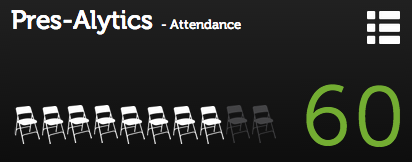
In the Presenter Dashboard, notice the Pres-Alytics (Attendance) area. There you’ll see a row of ten chairs and a green number. The green number is the total number of people have logged into your event.  If you have an audience with web-enabled devices, this should close to the same number of people in your session.

Screen Shot 2013-06-04 at 2.39.33 PM

The chairs indicate what percentage of your attendees are currently engaged. As the image shows, if 80% of the chairs are lit up then 8 of the 10 chairs will be lit up.

Who’s Engaged?

We know what you’re asking: how do we know if a person is or isn’t engaged? It’s not quite magic, but it’s as close as any developers could get.  Every two seconds, we send a “ping” to each device that is logged in. If they are still logged in, then all is well. If not, then after 30 seconds of inactivity by an attendee, it will be reflected in the Pres-Alytics row of chairs.  Note that every disengagement by an attendee is tracked in the analytics.

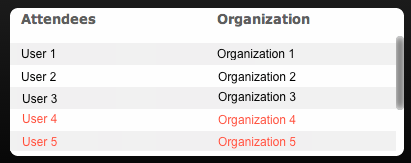
If you want to know who is or is not paying attention, just click or touch the list icon just above the green audience number to see the name of each person who has logged in to your event. If they’ve completed their audience profile, their organization will be displayed as well. Any person whose display name is in black is currently engaged. The names in red have disconnected from the presentation or need to wake their device back up.

engagement

Other Ways to Use Pres-Alytics:

As we described, the Pres-Alytics is a real-time and at-a-glance view of engagement.  What else can you do with this info?

  • You can use it to monitor the over-all engagement level of the session.  If you notice the chairs start to go dark, we suggest that you add some interaction on the fly – or break out your “RiverDance” routine.
  • If you are in a compliance or training-type presentation, you can use the Pres-Alytics to report on participation and engagement level.  Then you can call them out by name and tell them to pay attention!
  • If you are giving a sales or motivational presentation, you can monitor the Pres-Alytics to be sure your call-to-action is at the height of emotion.  If all the chairs are lit up, ask for the deal, the donation or the vote!

After Your Session

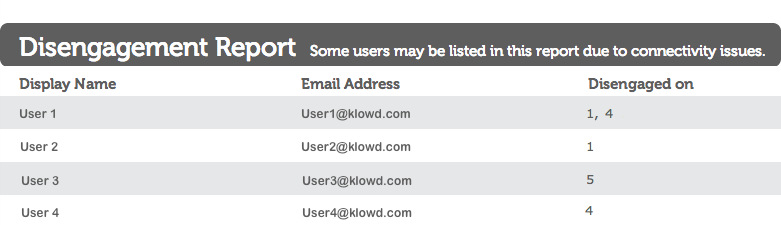
After you’re done presenting, take a look at the disengagement report in the Presentation Analytics to see what slide(s) they disconnected on. Consider your content: your slide, what you said, whether or not you had an interaction. Based on this data you can adjust and improve your next presentation.

Screen Shot 2013-06-05 at 3.17.06 PM

Presenter Feature: SK Rating

Basic rule of success #208:

You can’t improve what you don’t measure.

Screen Shot 2013-06-04 at 4.55.07 PMAs a presenter or speaker, you want proof that you’re awesome. That way, when you tell people, you have something to back it up. The SK (SlideKlowd) Rating is just that: a numeric grade on how well you engage your audience and get them to interact during your presentation.

The SlideKlowd platform records an SK Rating for each individual presentation as well as a cumulative average from all of your presentations – which becomes your presenter SK Rating. Were you feeling a little off your game last time you presented? Compare that event’s SK Rating to your overall number to find out if your audience thought so too. Dig in to the metrics to see where people disengaged or what interactions they ignored, because both of those will be reflected in your SK Rating.

Metrics

The SK Rating hangs out on the dashboard, under My Settings. Click on the SK Icon to discover just how great you are. It works on a scale of 1 to 100 – and just like most grades, the higher the number, the better. A presenter’s SK Rating is calculated using a few factors:

1- User Engagement- a cumulative percentage of engaged audience members per slide; throughout the course of the entire presentation activity.

2- Interaction Level – an aggregate percentage of interactions answered by all “joined” audience members over the course of the entire presentation.

3- EQ Rating- The Emotional Quotient is a composite of responses across ALL joined audience members to the automatic closing slide question of “How would you rate this presentation?”

4- Two optional bonus areas include Social and Notes. Each is a total of the percentage of audience members per presentation of who posted comments and/or used the audience note-taking tool. These interactions can only add to your SK Rating- a lack of comments, questions or notes does not deduct from it.

The numbers from Engagement, Interaction, EQ Rating and the bonuses are plugged into a patent-pending algorithm that crunches them into a number anyone can understand. Depending on what matters more to you as a presenter, the weight of each factor can be adjusted using the slide controls on the SK Rating dashboard. So, if you were wrongly heckled all the way through your presentation and you don’t want audience opinion to have any impact on your SK Rating, then drop its weight to a zero. It’s also a way to find out which you’re better at; keeping your audience engaged, or getting them to interact.
SK Rating Setting

Discovering which parts of your presentation engage people the most or the least will help you to become a better presenter. Once you start improving that, you’ll earn a higher SK Rating. As that goes up, so do your bragging rights. And ultimately the people who get to listen to you will be the real winners.

 SK Rating in Organizations

Organizations have just as much use for the SK Rating as any individual. Here are just a handful of ways a company or school can utilize this feature:

1- Efficiency- The SK Rating can help a Training Department improve the presentations and outcomes of a training session by holding the facilitators accountable.

2- Communication- Hear what your employees have to say about a meeting or presentation. An event’s SK Rating indicates employee engagement with the content and the presenter.

3- Competition- Put SlideKlowd in the hands of your sales team. They’ll work for higher SK Ratings and they’ll know what to work on- knowledge, skills or personality- which can only lead to increased sales.

4- Prediction- An SK Rating reflects both the presenter’s effectiveness and the audience’s reception. Use the SK Rating to determine the likelihood of closing a lead as potential buyers warm up to signing a check.

5- Assessment- Discuss a facilitator’s SK Rating during their annual evaluation. If it’s low, get that person into some training. On the other hand, promote a rock star to lead the team and reap the benefits of a Org. Development team that knows what it’s doing.