Tag Archives: Training

Training: Increase ROI

desk

Organizations invest a lot of money into training their workforce. From employee onboarding to continued education and skills development, the process doesn’t seem to stop. Smart companies are finding ways to ensure a better ROI on that investment- part of that is increasing engagement during that training.

Recently, a company used SlideKlowd during a webinar for employees who were scattered all over the Western United States. The event was a course through which agents could earn credits toward continued education incentives the company offers. In the past, organizers worried that employees were logging in to the event, then checking out to do other things but still claiming they’d participated in the webinar. The program lacked accountability.

That changed when their employees logged in using SlideKlowd. The administrator added questions to his presentation and required that employees answer them. This kept employees hundreds of miles away logged in at their computers and paying attention.

When employees leave a presentation or navigate away from an event, this is reflected in the Pres-alytics widget. The presenter can check to see who’s still connected to an event and who left in the middle of a presentation. When everything is said and done, that same information is presented in the presentation analytics and includes a list of which slides each user disengaged on.

Screen Shot 2014-01-07 at 10.18.51 AM

A high-level check for attendance can be found in the analytics report in a section titled, Unopened Invitations. This report is created when a presenter uses the invitations feature to get audience members connected to a presentation via email invites that are sent out before launching the presentation. Recipients of these emails simply have to click join from the invite to directly enter a presentation. Any invited participants who don’t join the presentation will automatically be listed in the Unopened Invitations report. 

Other companies have used SlideKlowd to check for understanding during the training process. Immediate feedback throughout training helps the individual disseminating knowledge to respond to the immediate needs of the people in front of them (or thousands of miles away), maximizing the time and effort expended in training. A few simple questions at the beginning of a session can help the trainer know where to start. After presenting the agenda for the day or a list of topics they intend to cover, she can poll employees on which topics they’re already well-informed, which they believe they need to spend extra time in and which they actually desire to know more. From there, she’s able to skip the stuff that is less necessary and focus on content that can truly help the group she’s been tasked with training.

*Photo by Raffaele Diomede: http://www.flickr.com/photos/diomedenet/

Audience-Centric Presenting

audience

Not about You

A paradigm shift that must take place for every single presenter out there is that your speech, PowerPoint, training session, illustrations- you name it- none of it is about you. It’s easy to get confused about this, because you’re at the front of the room, with a mic and everyone’s staring at you, but not for your own celebrity. These people want something from you.

So, if you’re nervous about speaking, that should offer some relief. You don’t necessarily have to look good. But, your content had better be freaking fantastic. Think back to college- if you were at university for more than a piece of paper, you appreciated the professors who actually taught you useful things that you’re hopefully still using now. If you’re still paying back any school loans, then you likely (and rightfully) resent the ridiculous people who pushed their own agendas and barely taught you a thing. You were paying for information. You wanted knowledge and insight that would help you become the super formidable professional you are today, right?

If you didn’t feel any of that, we hope you do now.

Because the people you’re training or speaking to need the same thing from you. They don’t want entertainment- if they did, they have plenty of other options, right? So, what do you do? For starters, include them in your presentation. The minute this whole thing stops being about you, your audience gains a voice. Your 45 minutes or hour is no longer a monologue, but a dialogue. SlideKlowd empowers your audience to speak their mind, to ask questions and to get everything they wanted from the experience, as long as you’re willing to hear them. If you’re using SlideKlowd in your presentation, we already assume that you’re awesome enough to pull this off- and do it well.

When you start thinking about your audience more than yourself, it’s also easier to let go of some of your less useful content. You love talking about ____, but everybody in this room already knows about ____ (Duh, it’s a ____ conference). You might be bummed, but the good news is that you can elaborate on something else and really keep the crowd’s attention while you’re at it. When you’re done, you’ll walk out feeling like a boss because not only did you not bore everyone to death, but you actively engaged them with information that’s going to change how they think about ____.

You’re running the show

The scary thing about giving a crowd a voice is that you don’t necessarily know if there’s a crazy person (or several) in the room. We’ve all had to deal with the bitter, militant human who really might not want to sabotage your presentation, but their demeanor seems to imply otherwise. Attempting filter someone like that out of the conversation nearly always seems to blow up- but SlideKlowd helps these people share their questions, comments, rants, stories, fears, conspiracies, experiences, etc. without making a huge fuss. It becomes easier when you have an established way for them to speak up. SlideKlowd has just that.

As the presenter, you have the power to manage the comment stream- that place where people can chat it up during your presentation. If it gets a little out of hand, turn it off. If you see something you like, address it. If a student/employee/audience member sends a question in, you- the teacher/trainer/presenter will be the only person to see it- unless you want to throw it up on the screen for the crowd to see. You get to control the situation. Your presentation might be about the audience, but that doesn’t mean it’s a free-for-all.

So, use that mic and PowerPoint presentation for the benefit of those who came to listen to you. Teach. Train. Educate. Be a boss. Use SlideKlowd and it’ll make focusing on, hearing from and managing your audience a million-billion times easier (and more fun). Plus, it’ll make you look good while your’e doing it.

*Photo by Mohammad Jangda: http://www.flickr.com/photos/batmoo/3734837951/

Individuated Learning

Educational theorists have been studying various learning styles since the 1970s (and probably before then, but that’s when this stuff started getting a lot of attention). They’ve been searching for ways to maximize the time and resources that schools and companies devote to eduction and training- because those are huge investments for any kind of organization. Most of these researching, theorizing types would agree that there are three main methods by which individuals take in and learn information: seeing, hearing and and doing.

Screen Shot 2013-10-15 at 11.25.11 AM

Visual learners are thrilled to see graphs, charts, lines, colors and images. They’re the people who’s eyes are glued to the screen while you present. Spatial relationships are also significant. If your screen is too small or too far away, it can be a huge detriment to learning.


Screen Shot 2013-10-15 at 11.25.00 AM

Next, you’ve got the auditory learners. Not only do they retain information better by hearing it, but also by speaking. Many of them read aloud to make sure they get the information they need. Most auditory learners don’t care so much about what your slides look like as much as they care about what you say- and how you say it.


Screen Shot 2013-10-15 at 11.25.25 AM

The third group is kinesthetic learners. People who learn this way have struggled the most in the past with traditional classrooms. They want to get their hands dirty and would rather be showed how to do something than told.

As a teacher, trainer or speaker, you’ll have all three of these learning styles in every single group you connect with. And it’s on you as the expert in the room to make sure they get the information you have. Daunting? It could be, but you’ve got great tools to work with.

SlideKlowd helps you individuate your learning by making your lessons, presentation or speech more interactive. The platform pushes your presentation to a projector screen and to nearly any of the web-enabled devices that your audience will have with them. This gets your awesomely designed PowerPoint slides up close and personal with your visual learners. They’ll love you for it and the proof will show in how well they retain your information.

Auditory learners benefit, too. Let’s start with a little secret– auditory learners hate when instructors turn away from them to write on a whiteboard. It stifles your voice and kills body language, forcing them to work harder. With a presentation that you navigate using your smart phone, you’re free to fully engage those who care the most about what you say and how you say it. Another benefit is that because most auditory learners don’t take notes, they can save your presentation to review later.

The kinesthetic learners are the people who’d bust their phones and tablets out the minute they get bored, so utilizing what they already have in their hands keeps them engaged. These guys and gals will be thrilled to be able to interact with you, the presenter using their technology. They can also take notes, tweet and post on Facebook about your presentation and keep up with the presentation while they’re at it.

Individuated learning is becoming increasingly significant in classrooms, training centers and elsewhere as educators and CEOs alike understand the necessity for their students or employees to really grasp the material they’ve been given. The smart ones are using what technology has offered them and utilizing what’s showing up, too- people’s smart phones, tablets and laptops.

Sales with SlideKlowd

Better Listening for More Sales

Communication is always listed as a necessary skill for any salesperson. Potential buyers need an understanding of a product and why they actually need it before they’ll part with their hard-earned money. Fortunately, most salespeople are naturally great talkers and few experience any difficulty in explaining their products or services. But communication is much so more than speaking.

In order to understand customer needs and desires, salespeople must be able to listen. Sometimes, they can gather information by asking questions. Other times, they have to let the customer talk through particular desires or challenges. It’s one thing to promote something based on its benefits, but wholly another when that same product is actually a sought-after solution. SlideKlowd helps salespeople to listen and discover what their clients are seeking, so they know which method will work best to close that sale.

It doesn’t matter if the salesperson is speaking to an individual or to a group of people, SlideKlowd can help them determine what their clients are seeking. All it takes is a couple of questions to gather enough information to tailor their sales approach to each customer. If your salesperson happens to be talking to a whole group, keeping track of everyone’s answers (their needs or desires) became much simpler.

Screen Shot 2013-07-12 at 1.58.49 PM

It looks like your salesman had better be talking about paint options, rims, heated leather seats and remote start if he’s going to get this crowd to buy. Each of the 39 responses here is recorded in the analytics along with the customer’s name and email.  This information can be reviewed later, before follow-up calls are made.

Working with your Customers

Once the sale is made, the customer needs to be taught how to use their new hardware, software, service, unicycle- whatever you sell. SlideKlowd will help your Client Services team get this done! Because the platform is cloud-based, it can be accessed anywhere. Whether the training is one-to-one or for a whole group (in various places), location isn’t a big deal. For their convenience, customers can view the presentation on their PC, laptop, tablet or smartphone- basically any web-enabled device.

Trainers just need to share an Event Key with clients who then can log in at SlideKlowd.com. The Client Services person can share all of their content with users and connect using their preferred conference call service. Users are able to take notes, ask questions, make comments and save the presentation so they can refer back to it later if they need to.

Screen Shot 2013-07-12 at 2.00.35 PM

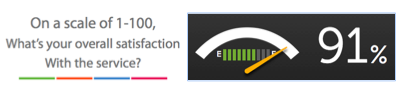
These same SlideKlowd features can be utilized in facilitating user groups. The platform provides a means to ask your customers about what features they use and enjoy the most, any changes would they like to see and it keeps convenient records of all of their questions and comments. After discussing specifics with a group of customers or potential buyers, a great way to close out the meeting is to ask about the overall satisfaction with the product.

Screen Shot 2013-07-12 at 2.02.31 PM

When the meeting is done, share the data gathered by the SlideKlowd platform (in the awesome analytics) with appropriate departments in your organization. Let the research and development team or your project managers know about feature requests, send frequently asked questions to your support department and make sure that the executive suite gets the good news and positive customer comments.

SlideKlowd helps your company listen by providing a means for polling your target audience and otherwise giving them a way to share their perceptions or ask questions. This works in sales, customer training and in research and development. Your sales people or trainers can use SlideKlowd with individuals or groups, all in one location or scattered all over the place and still get the information they need in our good-looking, easy to understand analytics.

Corporate Training and Development

Discover the Impact of Your Training Program

Organizations invest a lot of money into on-boarding new employees. Newbies need to learn about policies, benefits and culture, then complete a slew of paperwork. Add a whirlwind tour of the office, meeting the team and everything else that goes on and the question is, how much of that did they retain? Information about your dental insurance provider may not be a game-changer, but something like industry regulations regulations likely are.

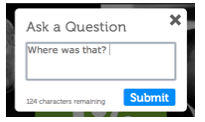
The depth of a new employee’s understanding will become clear when 1- they do something horribly wrong and cost your company a lot of money, or 2- you start using SlideKlowd during your training. Our platform encourages interaction by creating a way for your trainees to ask questions and make comments. Trainers or educators can test for understanding by building questions into a presentation and getting real-time answers.

For example:

Thumbs


The presenter can watch as answers pour in, share with the room (or not) and view each individual response. If the person running the show is too busy to take it all in, they can look at responses later- they’re all recorded along with other presentation analytics. Based on responses, trainers can then change their approach or revisit topics that weren’t particularly clear.

Once everything is said and done, new employees are better-educated in the awesomeness of your company.

Continuing Education

SlideKlowd works in any setting that would normally utilize PowerPoint. Cloud computing enables the platform to push content to personal devices where employees can write notes, save them and the presentation to review both later. Cloud technology makes access to presentations or training as simple as connecting to the Internet and logging in at SlideKlowd.com.

Companies spread over multiple campuses have the ability to connect and train everyone simultaneously by setting up a third screen at each location. Regardless of distance, employees can login to the presentation using the same event key, set by the presenter. Use your regular conference call service to connect audio and your whole company will be ready to go! The benefits? Train large portions of your workforce at the same, implement company-wide policy changes with fewer meetings and effect change in your organization at an accelerated pace.

Location

Grading papers isn’t your deal. If it was, you would’ve become a teacher, right? But you still need to make sure that your employees are understanding and retaining information. SlideKlowd makes a great testing tool. Put your questions on slides and place corresponding interactions- multiple choice, true or false, scales to test your staff. Every individuals’ answer is recorded in our handy analytics that you can export in html or in an Excel spreadsheet. Just run through each person’s answers send them their grade and you’re done! And you didn’t have to print a thing…

analytics report

SlideKlowd Usage Scenarios

Enterprise organizations are using SlideKlowd at the convergence of three areas:

1. Group/crowd collaboration
2. Distributed content
3. Need to gather data & measure effectiveness

Essentially, take any scenario where you traditionally use PowerPoint – but want to create engagement, collect data and measure the effectiveness of your meeting or presentation.

Considering the above factors, SlideKlowd is a daily-use tool in the following scenarios:

Corporate Training & Development
• Group training programs
• Employee engagement/internal communication
• New employee onboarding
• Open enrollment
• Compliance & regulation enforcement
• Continuing education

Marketing & Communications
• Corporate events
• Trade shows
• Product launch events
• Focus groups & town halls
• Community outreach

Sales & Client Services
• 1:1 and group sales presentations
• Sales team meetings
• Sales training
• Customer training
• User group facilitation
• Predictive Forecasting

Executive Suite
• Executive retreats
• Budgeting & Planning sessions
• Executive development
• Board meetings
• Investor relations / shareholder meetings

SlideKlowd can be used on any modern web-enabled device and with in-person, remote and blended sessions.  Because SlideKlowd is a cloud-based platform, it is easy to scale and deploy to groups and crowds of any size – from a 1:many event to 1:1 presentation.

What People Are Saying About Us

WhatPeopleSay-Banner

March 2013

What’s the difference between a consumer and an employee? Notes from SXSW.
SAP | Mar 16, 2013

February 2013

After PowerPoint, What’s Next? SlideKlowd.
Fassforward Consulting | Feb 22, 2013

Audience Management – Tools, Software and Tickling
Fennec Marketing Group | Feb 12, 2013

Meet SlideKlowd
The Virtual Presenter | Feb 7, 2013 

January 2013

Heads in the Klowds: Eagle tech firm in the business of learning from crowds
Idaho Statesman | Jan 4, 2013

December 2012

Boise Startup: Klowd Lets Attendees See The Presentation On Their Smartphone
Nibletz | Dec 17, 2012

Review and Demo of @SlideKlowd – a Game-changer app for Events, Conf. & Training
HR Virtual Café | Dec 14, 2012

November 2012

Ten apps made in Idaho you should know about
Idaho Statesman (Business Insider) | Nov 14, 2012

Klowd.com
Idaho Technology Council | Nov 6, 2012

SLIDEKLOWD MAKES PRESENTATIONS MORE INTERACTIVE
Tech Cocktail | Nov 2, 2012

October 2012

SLIDEKLOWD PUTS CLOUD, PRESENTATIONS IN THE HANDS OF STUDENTS
Online Colleges | Oct 9, 2012

New Presentation Tool Lets You Easily Keep Students Engaged
Edudemic | Oct 7, 2012

Idaho CEOs provide feedback via new app
Idaho Statesman | Oct 5, 2012

Klowd launches social teacher app
EdTechTimes | Oct 5, 2012

September 2012

Klowd.com Launches New Social Presenter App: Be Stunned With Awesome Presentations
The Technology Café | Sep 17, 2012

August 2012

Klowd.com Launches New Social Presenter App
Learning Solutions Magazine | Aug 29, 2012

SlideKlowd presentation app: not just for conferences
AGBeat | Aug 22, 2012

Connect to your audience with SlideKlowd
Tony Wragg’s Tech Talk | Aug 17, 2012

SlideKlowd Offers New Presentation Capabilities With Smart Phones and Tablets
TechCrunch | Aug 13, 2012

May 2012

Treasure Valley tech company tackles crowd engagement, in a hurry
Idaho Business Review | May 3, 2012

Wisdom = The Questions You Ask ~ Justin Foster of MindShare Networks
Startup Week.ly | May 1, 2012

HR Virtual Cafe agrees SlideKlowd is a game-changer!

Susan Avello from HR Virtual Cafe, HR’s top blog on human capitol, social media, technology and everything in between, writes a review on SlideKlowd: Review and Demo of @SlideKlowd – a Game-changer app for Events, Conf. & Training. Check it out: http://hrvirtualcafe.com/2012/12/14/review-and-demo-of-slideklowd-a-game-changer-app-for-events-conf-training/