Having an idea accepted and supported, and even funded, is something that you require on a daily basis. Whether presenting to a potential client, investor, or the business community, your presentation and sales skills are always being tested. How do know what your audience is thinking? Typically, non-vocal cues, like a head nod or a smile, are good indicators. But what about those straight-faced, cerebral types? You can use SlideKlowd to achieve a real-time connection with your audience by measuring engagement, distributing content, and capturing their feedback and opinions…from any device. Here are four scenarios where you can use SlideKlowd.
Client Pitch
SlideKlowd helps structure a sales presentation into a pitchbook format to guide the conversation with your audience, encourage one-on-one engagement, determine the client’s need for your product, and provide timely opportunities to ask for the sale. This way you can communicate and build rapport with your audience, rather than just lecturing them about the features and benefits of their product.
Here’s our SLIDE approach to creating a pitchbook presentation with SlideKlowd: Creating One-on-One Engagement Through Pitchbook Presentations. Incorporating SlideKlowd and the SLIDE format into your client pitch allows you to connect to your clients, gather their opinions, ask for their feedback and create one-on-on engagement that creates a truly memorable experience for them.
Investor Panel Pitch
 You have approximately 10 minutes to capture the investor’s attention from the moment they sit down until the buzzer goes off. Your investor pitch should not only include the essentials, such as key financial drivers, a strong business model and a smart marketing plan, but also a compelling story that hits them at their core. In addition, your story needs to be captivating enough to keep the investors from being distracted.
Here are three ways you can use SlideKlowd to create real-time engagement and immediate behavior change with your investors:
- Take the investors through a scenario that illustrates the problem you are trying to solve. Tap into their emotion and what matters to them most. This may require doing some research on them beforehand. Once you’ve connected with them at a human level, use SlideKlowd to ask them how they feel about the problem. Ask them to commit to their own pain! Then introduce the solution: your product!
- Have a little fun talking about the competition. Let them know you’ve done your homework by presenting who your competitors are and then “quiz” them on who has a bigger market share in a specific area. Make sure it is a market that you are not focused on. Share results and let them know the right answer. The next slide will be information on your product’s advantage and the niche market you are targeting.
- At the end of your pitch, ask them how much they would spend to solve the problem. Use the multiple-choice interaction to give them options.
Startup Showcase or Conference Booth
Participating in a Tech Cocktail startup showcase, a meetup or a conference can quickly lead to the dreaded task of manning a trade show booth. And we all know how fun that is! You can easily make it an interactive experience with your audience, by adding SlideKlowd awesomeness. Talk to the event organizer and ask them to include instructions on downloading SlideKlowd in the registration process. In exchange, you will add content they want delivered to the audience member’s devices, collect responses and share results back with them. If that doesn’t fly, ask guests to download the free app when they arrive at your booth.
Use SlideKlowd to collect data from your audience, have them rate themselves on a particular issue, ask for their opinion or provide feedback. Once they have signed-in to the app, you have their name, email address and any other information you have requested. Your presentation deck alternates with one slide of product information and one of nine different SlideKlowd interactions. While you have let your guests know that their opinion matters you have conducted valuable market research. For more information on how to use SlideKlowd to gather data from your audience visit our blog post on Presenter Feature Scenario: Data and Information Collection.
Speaking Gig
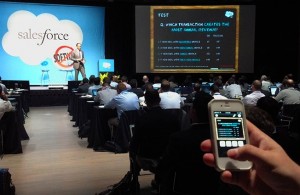
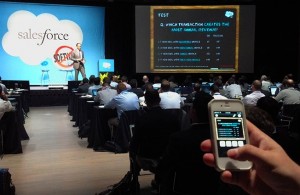
Salesforce’s CFO, Graham Smith, using SlideKlowd at the 2012 Dreamforce Conference.
You haven’t gotten where you are without being an expert in something. Because of this you are often asked to speak at events. SlideKlowd can be used to sweeten the pot on your presentations. Take the content, upload to SlideKlowd and voila! You now have reached a larger and more engaged audience, at the same time helping them stay away from shenanigans on their devices. Take it a step further, and use SlideKlowd to ask for a behavior change, gather feedback and conduct market research.
See how our clients have used SlideKlowd in their speaking gigs here.
Whether you are pitching your idea to a small group or presenting on a topic to a larger audience, allow your audience to bring their device and use SlideKlowd to:
- Immediate feedback on what your audience is thinking.
- Increase engagement.
- Collect audience data and responses.
- Manage messages, content, and participation.

 In mid-April we head to a southern style digital funfest: DIG SOUTH Interactive Festival 2013 in Charleston, SC where technology, social media, marketing and the arts merge. Our CMO, Justin Foster, joins a reputable crew of panelists on Saturday, April 13 to discuss GEAR UP: Apps, Tools and Emerging Technologies. In the midst of our planning, we have had the pleasure of getting to know DIG SOUTH’s VP of Development, Sunny Gray, and her husband and Executive Producer, Stanfield Gray. They recently shared some insight on the planning and activities behind DIG SOUTH.